

If you’ve ever shipped software that ran smoothly in your dev environment but failed under real-world use, you already know that “it works” isn’t enough. To catch the issues that hide under the surface, you need to look inside the code: structure, logic and internal behaviour. That’s exactly what white box testing is for.
What Is White Box Testing?
White box testing is a software testing method that looks directly at the internal structure, code and logic of an application. Unlike black box testing, which focuses only on what the software does, white box testing focuses on how it does it. You work with full access to source code, design documents and system architecture so you can design tests that verify each internal component behaves correctly.
According to NIST SP 800-137, white box testing is “a test methodology that assumes explicit and substantial knowledge of the internal structure and implementation detail of the assessment object.” This definition, used in cybersecurity standards, underlines how important this method is for rigorous software validation.
White box testing also appears under other names: glass box testing, clear box testing, transparent box testing and structural testing. All of these refer to the same idea: testing with full visibility into how the application works internally.
Why White Box Testing Matters for Software Quality
Testing from the inside out exposes problems that outside-only testing will miss. White box testing helps you:
- find security vulnerabilities before attackers do
- highlight inefficient code that drags down performance
- verify every logical path in your application behaves as intended
It is especially valuable during development. When developers write unit tests while building features, bugs get caught immediately, and the fix takes minutes rather than days. IBM research shows that defects found during coding cost 5–10 times less to fix than defects found during system testing and 15–100 times less than defects found in production.
White box testing also fits neatly into modern practices. Automated white box tests integrate into continuous integration/continuous delivery (CI/CD) pipelines and run with every code commit. That automation helps keep code quality consistent as your application evolves.
Core Objectives of White Box Testing
What is white box testing trying to accomplish?
First, you want thorough code coverage. White box testing helps ensure that tests run every statement, branch and path through the code. Coverage tools show you exactly which lines execute during tests and highlight areas that remain untested and potentially risky.
Second, you aim to optimise code quality. By inspecting internal structures, you can spot inefficient algorithms, redundant operations and unnecessary complexity. Refactoring becomes safer because tests act as a safety net that catches logic errors introduced during optimisation.
Third, you need to validate security. White box testing helps identify vulnerabilities such as SQL injection points, buffer overflows and authentication bypasses. According to OWASP guidelines, direct source code examination exposes security flaws that black box testing often misses.
Fourth, you want early defect detection. Testing at the code level catches issues before they spread into integration and system testing. This early detection saves development time and reduces overall cost.
The Key Objectives White Box Testing Achieves
White box testing looks closely at several critical aspects of your software’s internal structure and behaviour.
Security verification confirms that the code defends properly against internal and external attacks. Research from Synopsys shows that many applications contain vulnerabilities that static analysis tools can detect, but these often remain unresolved when teams lack solid white box testing processes.
Logic validation ensures your control structures behave correctly. If-else blocks, switch cases and loops all need to execute as designed. White box testing checks that conditional logic covers all paths, including edge cases.
Data flow verification tracks how data moves within the application. Variables must be initialised correctly, passed between functions without corruption and cleaned up properly to prevent memory leaks or stale state.
Structural integrity checks interactions between components. When one function calls another, parameters must be passed correctly, return values must be handled properly, and error conditions must propagate as designed.
Types of White Box Testing
What is white box testing composed of?
White box testing includes several specific testing types, each focused on a different quality attribute.
Unit Testing
Unit testing targets individual functions or methods in isolation. You write tests that call one piece of code with different inputs and verify that the outputs match expectations. Unit tests are fast, often running in milliseconds, so you can cover thousands of scenarios efficiently.
Integration Testing
Integration testing checks that separate code modules work together correctly. After unit tests confirm that individual functions work in isolation, integration tests validate the interfaces between them. You ensure data is passed correctly between components and that the combined behaviour produces the right results.
Static Code Analysis
Static analysis reviews source code without running it. Tools scan for syntax errors, code smells, security vulnerabilities and coding standard violations. This often runs continuously as developers write code, giving immediate feedback.
Automated tools can reliably detect certain classes of vulnerabilities, although manual code review is still required for full security assurance.
Mutation Testing
Mutation testing checks how effective your tests really are. Tools make small, controlled changes to the code (mutations) and then rerun the test suite. If tests still pass after the mutation, your tests have missed a potential defect, signalling a gap in coverage or assertions.
Penetration Testing (White Box)
White box penetration testing simulates attacks with full access to system internals. Ethical hackers use source code and architecture knowledge to uncover weaknesses and attempt to exploit them. With internal visibility, they can find vulnerabilities faster than in black box penetration testing, where time is spent just figuring out how the system is built.
White Box Testing Techniques and Coverage Methods
Several coverage techniques help you verify internal behaviour thoroughly. Each one focuses on a different angle of code structure.
Statement Coverage
Statement coverage ensures that every line of code executes at least once during testing. You design test cases that trigger each statement, revealing dead code, unreachable logic and simple errors.
Example:
def validate_age(age):
if age >= 18:
return "Adult"
else:
return "Minor"
For statement coverage, you need two tests: one with age >= 18 and one with age < 18. Together, these execute all lines in the function.
However, statement coverage alone is limited. You can execute every line without properly testing all logical combinations.
Branch Coverage
Branch coverage ensures that every branch of each decision point executes at least once. Every if-else, switch-case, or conditional loop creates branches. Branch coverage requires that both the true and false paths (or all cases) are tested.
This gives stronger guarantees than statement coverage. Testing research shows that 100% branch coverage automatically implies 100% statement coverage, but 100% statement coverage does not guarantee branch coverage.
Path Coverage
Path coverage focuses on every possible route through the code from entry to exit. With nested conditions and loops, path coverage becomes more exhaustive than branch coverage.
Example:
if condition_A:
do_something()
if condition_B:
do_more()
else:
do_alternative()
Path coverage here requires:
- condition_A true and condition_B true
- condition_A true and condition_B false
- condition_A false
Each case follows a different route through the code.
Path coverage grows complex fast. As conditions and loops increase, paths can grow exponentially, making 100% path coverage unrealistic for larger systems.
Condition Coverage
Condition coverage ensures that every boolean sub-expression in a decision can evaluate to both true and false. For compound conditions that use AND/OR, you test each part independently.
Example:
if (age > 16) and (hasLicense == True):
allow_driving()
Condition coverage requires:
- age > 16 true and hasLicense true
- age > 16 false (regardless of hasLicense)
- age > 16 true and hasLicense false
Loop Coverage
Loop coverage checks that loops behave correctly under different iteration counts:
- Zero iterations (condition false from the beginning)
- One iteration (minimum valid run)
- Multiple iterations (typical case)
- Maximum or boundary iterations
This helps you catch off-by-one errors, infinite loops and incorrect loop variable handling.
What to Verify During White Box Testing
What is white box testing examining in your code?
White box testing focuses on several key aspects of code behaviour.
Logical flow verification checks that control structures behave as intended. If-else blocks must evaluate conditions correctly, switch statements must handle all cases, and loops must run the expected number of times.
Function behaviour validation ensures functions return the right outputs for given inputs. You cover normal scenarios, boundary cases and error conditions to confirm behaviour across all situations.
Security vulnerability detection looks for exploitable issues. You check for SQL injection, cross-site scripting, buffer overflows, authentication bypasses and exposure of sensitive data.
Error handling validation confirms that exceptions and error states are handled properly. Tests check that error handlers trigger as expected, resources are cleaned up correctly, and error responses do not reveal sensitive implementation details.
Data integrity checks ensure that variables hold correct values throughout execution. You verify correct initialisation, updates and cleanup when variables go out of scope.
Internal integrations verification focuses on internal interactions. Function calls must receive the correct parameters, return the expected types and values and avoid corrupting shared state through side effects.
How to Perform White Box Testing: A Step-by-Step Process
A structured process makes white box testing both thorough and manageable.
Step 1: Analyse Source Code
Start by understanding the codebase. Review functions and modules, map out control flow paths, identify data dependencies and get a clear picture of the architecture. Create flow diagrams or control flow graphs to visualise logic paths.
Step 2: Identify Test Requirements
Decide which coverage criteria you need. For critical security components, you might aim for higher path coverage. For simpler utility functions, branch coverage may be enough. Balance thoroughness with time and resource constraints.
Step 3: Design Test Cases
Design test cases to satisfy your chosen coverage goals. For statement coverage, build tests that execute each line. For branch coverage, ensure that every decision takes all possible outcomes. For path coverage, identify distinct routes through the code and create tests for each one.
Step 4: Execute Tests
Run the tests consistently and systematically. Use automated testing frameworks so that tests execute quickly and reliably. Track which statements, branches and paths each test covers.
Step 5: Measure Coverage
Use coverage tools to measure how effective your tests are. These tools track which code runs during tests and produce coverage reports. Common tools include JaCoCo (Java), Coverage.py (Python) and Istanbul (JavaScript).
Research suggests that aiming for 80–90% code coverage gives strong value. Going from that range to 100% often yields diminishing returns, since the remaining code is usually defensive or rarely executed error-handling logic.
Step 6: Analyse Gaps
Review coverage reports to locate untested code. Focus on filling gaps in critical paths, security-sensitive areas and complex logic. Some uncovered regions may represent dead code that you can remove.
Step 7: Refine and Iterate
Keep tests aligned with code changes. Refactor test code to make it clearer and more maintainable. Add tests for new scenarios as they appear. Integrate tests into your CI/CD pipeline for continuous validation.
Advantages and Limitations of White Box Testing
What is white box testing offering you, and where does it fall short? Understanding both sides helps you use this method effectively.
Advantages
- Thorough testing coverage is one of the main benefits. By checking internal structures directly, you can validate behaviour that external testing cannot see.
- Early defect detection keeps costs low. Fixing bugs during implementation is far cheaper than fixing them after release.
- Code optimisation opportunities naturally emerge. As you test code paths, you identify inefficient algorithms, unnecessary calculations and complexity that can be simplified. With tests in place, you can refactor while maintaining confidence in behaviour.
- Security vulnerability identification becomes more reliable. White box testing exposes injection flaws, authentication issues and data leakage risks before attackers find them.
- Automation potential is high. Once you have built a good test suite, automated runs on each commit provide continuous quality checks with minimal manual effort.
Limitations
- High skill requirements are a real barrier. Testers need strong programming knowledge, familiarity with the codebase and comfort with testing tools and frameworks.
- Time-intensive setup is unavoidable at the start. Building comprehensive tests for a large system can take weeks or months, which can slow initial progress.
- Maintenance overhead grows as the code evolves. When implementation changes, tests must adapt. Tightly coupled tests can become brittle and require frequent updates, even for low-risk refactors.
- Inability to test missing functionality is inherent. White box testing cannot validate features that have not been implemented. You still need black box testing to confirm that all requirements are actually delivered.
- Test design bias can appear when developers test their own code. They might unintentionally avoid problematic edge cases or design tests around assumptions rather than requirements.
Tools and Frameworks for White Box Testing
Various tools support white box testing across languages and stages of development.
Unit Testing Frameworks
JUnit (Java) provides annotations for tests, assertion methods and runners for executing suites. It integrates with Maven, Gradle and major Java IDEs.
pytest (Python) offers a simple syntax, fixtures for managing dependencies, parametrised tests to reduce repetition and detailed failure reports.
NUnit (.NET) supports multiple .NET languages, integrates with Visual Studio and includes a rich set of assertion helpers.
TestNG (Java) builds on ideas from JUnit and adds features such as parallel execution, flexible test configuration and advanced assertion options.
Code Coverage Tools
JaCoCo measures coverage in Java applications, including line, branch and method coverage. It works seamlessly with Maven, Gradle and CI tools.
Coverage.py provides statement coverage for Python, highlighting which lines execute during tests and which remain uncovered.
Istanbul (for JavaScript/TypeScript) measures coverage and integrates with Jest, Mocha and other JS testing frameworks.
Cobertura supports multiple languages and generates HTML reports with coverage statistics. It integrates with CI tools such as Jenkins.
Static Analysis Tools
SonarQube performs static analysis across 25+ languages, reporting on code quality, security vulnerabilities and technical debt. It provides dashboards for tracking trends over time.
ESLint (JavaScript) enforces coding standards and flags problematic patterns. It is highly configurable and widely used in modern JS workflows.
Pylint (Python) checks for errors, style violations and refactoring opportunities and integrates with most Python IDEs.
Coverity focuses on identifying security-relevant defects. Synopsys reports that it can detect over 70 categories of issues that may lead to vulnerabilities.
Black Box vs White Box vs Grey Box Testing
What is white box testing compared to other approaches?
White box testing sits alongside black box and grey box testing as part of a complete strategy.
Black box testing checks functionality without any knowledge of internal code. Testers focus on inputs and outputs, confirming that behaviour matches requirements. It models user behaviour and validates the system from the outside, but cannot confirm internal logic or ensure full code coverage.
White box testing looks inside the implementation. Testers examine logic paths, data flow and internal structure with full access to the code. This approach delivers high coverage and precise defect localisation, but requires technical skills and does not verify unimplemented requirements.
Grey box testing uses partial knowledge of system internals. Testers may understand architecture, interfaces, or data structures, but still test mainly via external interfaces. This balances the depth of white box testing with the practicality of black box testing.
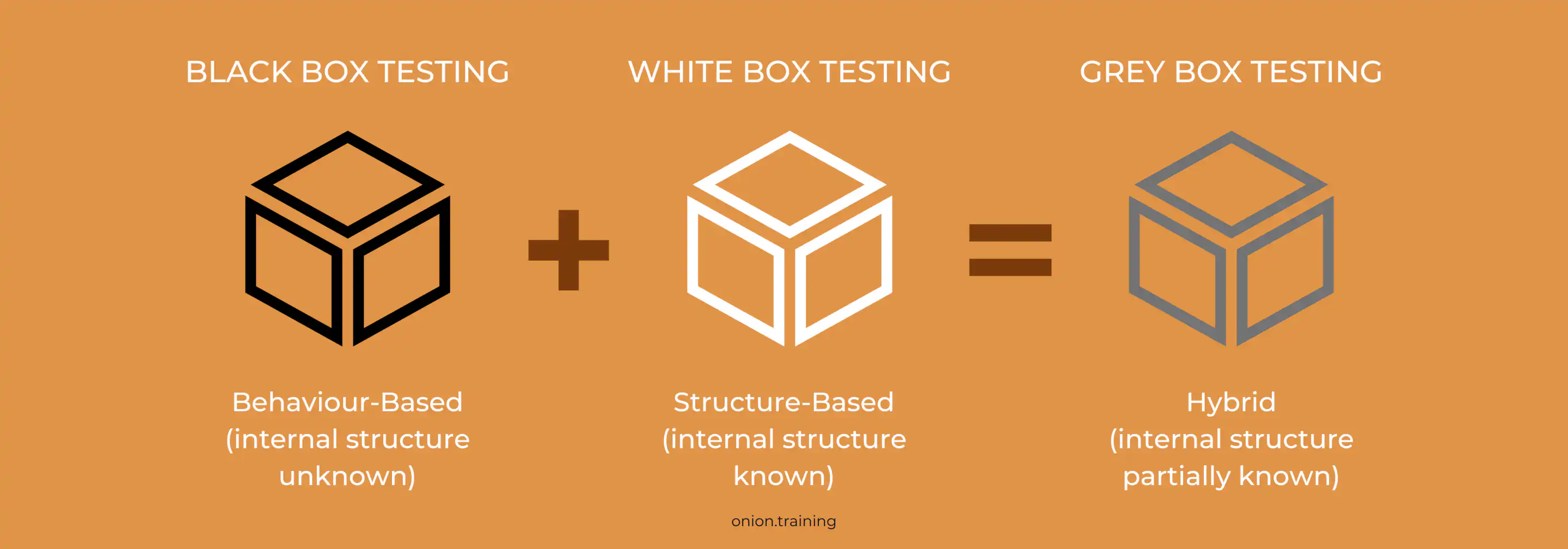
According to ISO/IEC/IEEE 29119 software testing standards, a mature testing strategy uses all three: white box testing to validate internal quality, black box testing to verify external behaviour against requirements and grey box testing to efficiently test integration points and complex flows.
Best Practices for Effective White Box Testing
Several practices make white box testing more effective and sustainable.
Start testing early in development. Write unit tests while implementing features and adopt test-driven development (TDD) where appropriate. Early tests catch issues while they are cheap to fix.
Automate comprehensively with frameworks and CI/CD integration. Automated tests run on each commit, reducing manual effort and catching regressions quickly.
Set realistic coverage targets rather than chasing 100%. Aiming for 80–90% coverage usually delivers strong value. The remaining percentage often covers corner cases and defensive code with low payoff.
Focus on critical paths. Concentrate your efforts on security-sensitive areas, complex algorithms and high-traffic functions. Not all code deserves the same level of scrutiny.
Review and refactor tests regularly. Treat test code as first-class. Remove duplication, improve readability and keep tests aligned with current requirements and architecture.
Combine with other testing methods. White box testing does not replace black box, integration, or acceptance testing. Use it alongside these methods for broad coverage.
Use code reviews alongside tests. Combining reviews with white box testing improves quality further.
Monitor test execution time. Keep unit tests fast. If the suite becomes slow, developers stop running it often, which undermines its value.
Key Takeaways - What is White Box Testing?
- White box testing examines internal structure, code and logic, not just external behaviour
- It gives full access to source code, enabling detailed verification of statements, branches, paths and data flow
- Coverage techniques include statement coverage (every line), branch coverage (all decision outcomes) and path coverage (all routes through code)
- White box testing can catch 60–90% of defects during development, when fixes are 5–15 times cheaper than at later stages
- Unit testing, integration testing, static analysis and white box penetration testing are key types under this approach
- It requires programming skills and introduces maintenance overhead as the codebase changes
- Frameworks like JUnit, pytest and NUnit support scalable white box testing integrated into CI/CD pipelines
- Coverage tools such as JaCoCo and SonarQube measure test effectiveness and expose untested code
- Targeting about 80–90% coverage delivers strong value without wasting effort on low-yield cases
- White box testing works alongside black box and grey box testing to provide comprehensive assurance
- Effective white box testing depends on starting early, automating thoroughly, focusing on critical paths and combining with other testing approaches
Frequently Asked Questions - What is White Box Testing?
Q1: What is white box testing, and how does it differ from black box testing?
White box testing examines the internal code structure, logic and implementation details of software. You work with full access to source code and design documents, and design tests that verify internal behaviour. Black box testing looks only at inputs and outputs, checking whether external behaviour matches expectations without any knowledge of internal implementation. According to NIST SP 800-137, white box testing “assumes explicit and substantial knowledge of the internal structure,” whereas black box testing assumes none. Both are needed: white box for code quality, black box for functional correctness.
Q2: When should you use white box testing in the development process?
Use white box testing during unit and integration testing phases. Developers typically write unit tests while building features, often following TDD practices. These tests run automatically via CI/CD pipelines on each commit. Static analysis should run continuously during development to flag quality and security issues early. White box penetration testing should be carried out before major releases, especially for security-critical systems.
Q3: What code coverage percentage should you target?
Aim for 80–90% code coverage as a practical target. Research indicates that this range provides strong assurance without excessive overhead. The last 10–20% tends to be error handling, defensive code and rare edge cases. You can raise coverage targets for critical modules, such as security components (e.g. 95%+) and accept lower coverage for simple utilities (e.g. 60–70%). Treat coverage as a guideline, not an absolute goal.
Q4: What tools are commonly used for white box testing?
Tool choice depends on language and stack. For unit testing, JUnit is common for Java, pytest for Python and NUnit for .NET. For coverage, JaCoCo (Java), Coverage.py (Python) and Istanbul (JavaScript) provide detailed metrics. SonarQube is widely used for static analysis across many languages. According to the 2024 Stack Overflow Developer Survey, Jest, pytest and JUnit are among the most used testing frameworks. The priority is integration with your existing tooling and CI/CD setup.
Q5: What are the main advantages of white box testing?
White box testing detects a large proportion of defects during development, when fixes are cheapest. It enables high code coverage, validates all logic paths and pinpoints implementation-level issues. It plays a major role in security by identifying vulnerabilities before release. It also encourages better code structure and performance by exposing inefficiencies. Once in place, automated tests provide continuous feedback on each change.
Q6: What are the limitations of white box testing?
White box testing requires significant technical skill and time to implement. Building and maintaining comprehensive test suites for large systems can be expensive. Tests tied closely to implementation can become fragile when code changes, increasing maintenance work. White box testing cannot detect missing requirements: if something was never coded, internal tests will not catch that absence. There is also a risk of bias when developers test their own code. White box testing must be paired with other forms of testing to achieve full coverage.
Q7: How does white box testing improve security?
White box testing improves security by examining code with full visibility. Static analysis tools detect patterns related to SQL injection, cross-site scripting, buffer overflows, authentication flaws and insecure data handling that black box testing may not expose. OWASP guidelines emphasise the value of source code review for finding security issues that are invisible from the outside. White box penetration testing uses knowledge of the internals to target likely weak spots.
Q8: Can white box testing be automated?
Yes. White box testing is well-suited to automation. Unit testing frameworks like JUnit, pytest and NUnit run test suites automatically. Static analysis tools scan code in the background. Coverage tools collect metrics without manual effort. CI/CD pipelines orchestrate all of this so that every commit triggers tests and analysis. Some work still requires human input, such as designing meaningful test cases, interpreting static analysis findings and performing in-depth white box penetration tests.
Q9: How does white box testing fit into agile development?
White box testing aligns closely with agile practices such as TDD and continuous integration. Developers write tests before or alongside the code, follow the red–green–refactor cycle and run tests on every commit. Automated test suites act as a safety net for frequent changes. According to the 2024 State of Agile Report, a large proportion of agile teams use TDD or behaviour-driven development, both of which depend heavily on white box tests. Agile teams also use sprint retrospectives to review test coverage, defect trends, and adjust testing approaches.
Q10: What is the relationship between white box testing and code coverage?
Code coverage is one of the primary metrics for judging the effectiveness of white box testing. Coverage reports show which lines, branches, or paths have been executed during tests. Statement coverage measures lines executed, branch coverage measures decisions tested and path coverage measures complete routes through logic.
Related articles
What is Non-Functional Testing in Software Development?