

If you have ever asked yourself, ‘What is functional testing?’, put simply, it is the process that confirms your software does what it says on the tin. It takes each feature, compares it against the requirements and checks whether the application behaves correctly.
You build software for a reason: to help users do something specific. They expect your app to respond properly when they click a button, submit a form, or pay for something. Functional testing is how you check that all of that actually works in practice.
Take a banking app login, for example. You type in your username and password and tap “Log in.” Functional testing makes sure that:
- With valid credentials, you land on your account dashboard
- With invalid credentials, you see a clear error message
Every action should lead to an expected, correct outcome.
This guide answers ‘what is functional testing’, why it matters, the main types and techniques and how to do it well.
What is Functional Testing?
Functional testing is a type of software testing that checks whether an application’s features work according to the specified requirements. It answers a simple but critical question: Does the software do what it is supposed to do?
You use functional testing on an application, website, or system to confirm it’s doing exactly what it was designed to do. Unlike testing types that focus on performance, security, or code quality, functional testing is all about the correctness of behaviour.
When you run functional tests, you:
- Provide inputs
- Perform actions
- Check that outputs match expectations
You don’t care how the code is written or which design pattern is used. You care only that the feature behaves as required from a user’s point of view.
Functional testing is a black-box testing approach. Testers look at inputs and outputs without examining the internal implementation. This mirrors how real users interact with the system: they don’t see the code, they just see what happens when they click a button or type an input.
A Simple Example of Functional Testing
Take a standard login feature on a website. Functional testing for this feature would cover scenarios like:
- Users can log in when they enter the correct credentials
- Users see appropriate error messages when they enter incorrect credentials
- Users can reset their password using the password recovery flow
- The login button responds correctly when clicked
- The system handles empty fields in a sensible way
Each test is there to confirm that one specific aspect of the login function behaves exactly as the requirements say it should.
Why Functional Testing Matters
Functional testing is the foundation of software quality assurance. Without it, you have no proof that your application actually works for users. It’s not enough to test only the “happy paths.” Negative scenarios, edge cases and failure conditions must be validated as well, because real users don’t always behave predictably and systems don’t always receive perfect data.
A product might pass performance tests and security scans, yet still fail on basic usability if core functionality is broken. A fast, secure app that doesn’t let users complete their tasks is effectively useless. Thorough functional testing, including unexpected inputs, boundary conditions and error-handling paths, prevents these failures from slipping into production.
The Boeing 737 MAX crashes are a prime example of how testing was one of the factors that failed at a critical level. The MCAS system was tested against ideal conditions: it should activate when the angle-of-attack sensor reports a high value. Testing assumed the sensor input would always be correct, so failure modes - incorrect data, sensor disagreement, repeated activations, or pilot override scenarios were never validated. The software worked according to its narrow requirement, but was never functionally tested against real-world situations.
When a single faulty sensor triggered MCAS, the system repeatedly pushed the aircraft’s nose down, leaving pilots unable to recover. Two aircraft crashed, killing 346 people. The root cause included incomplete testing, unrealistic assumptions, and missing negative and edge-case scenarios, among other contributing factors. It remains one of the most significant examples of how gaps in functional testing can play a role in catastrophic real-world consequences.
Key benefits of functional testing:
Early Bug Detection: Functional testing helps you catch bugs and defects early in the development lifecycle. Fixing issues during development is far cheaper and faster than after release.
Requirement Validation: It ensures that the application meets the requirements and specifications. You verify that what was built is what stakeholders actually asked for.
Better User Experience: By making sure features behave correctly, consistently and safely under both normal and abnormal conditions, functional testing directly lifts user experience and perceived quality.
Cross-Platform Compatibility: Functional tests verify that the application behaves correctly across platforms, environments and user conditions, including Windows, macOS, iOS, Android, and different browsers.
Regulatory Compliance: In regulated industries, functional testing helps demonstrate that software behaves in line with industry standards, regulations and legal requirements.
Types of Functional Testing
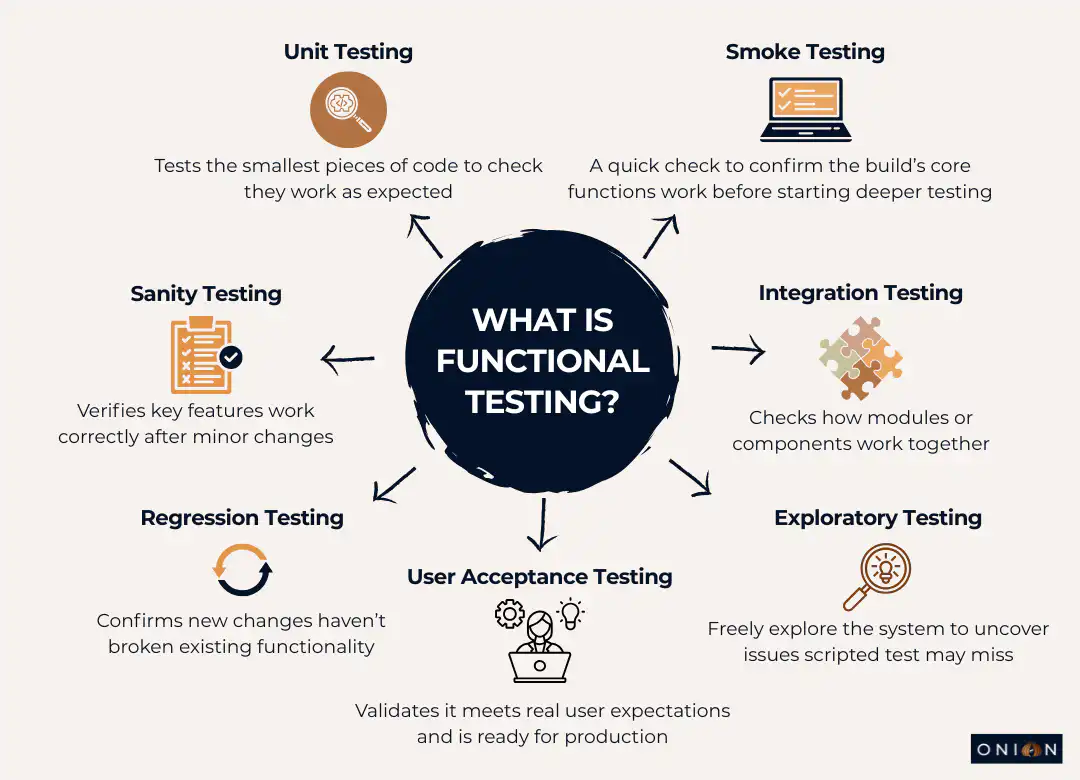
Functional testing is an umbrella term. Underneath it sit several specific testing types, each focusing on a different aspect of functionality.
Unit Testing
Unit testing targets the smallest pieces of code, such as functions, methods, or classes. Developers write unit tests to verify that each unit behaves correctly and returns the expected results.
In unit testing, you aim for good code coverage, including:
- Line coverage
- Code path coverage
- Method coverage
Unit tests catch defects at the lowest level before they spread into other parts of the system.
Smoke Testing
Smoke testing runs after each new build to confirm the basic, critical functionality still works. It is a quick check that the build is stable enough for deeper testing.
The question smoke tests answer is: “Is this build usable for further testing?”
If smoke tests fail, there is no value in running more detailed tests. The build goes straight back to development for fixes.
Sanity Testing
Sanity testing usually comes after smoke testing. It focuses on checking that major features work correctly in a limited, targeted way, both on their own and in combination with related components.
It is more focused than smoke testing but not as extensive as full regression testing.
Integration Testing
Integration testing checks how different modules or components work together. A module may function perfectly on its own, but you also need to know that it integrates correctly with others.
Anywhere multiple functional modules must interact - APIs, services, UI modules - integration testing verifies that these interactions behave as expected. Integration points are common places for defects to appear.
Regression Testing
Regression testing ensures that new changes (features, bug fixes, refactors) have not broken existing functionality.
As the codebase grows, regression testing becomes more important. Every change carries a risk of side effects. Regression tests are your safety net against unintended consequences in other areas of the application.
User Acceptance Testing (UAT)
User Acceptance Testing puts the software in front of real users or their representatives. They run the application in realistic scenarios and decide whether it meets their expectations.
UAT checks that the software is ready for production. It often uncovers usability issues and gaps that internal teams have missed, because users naturally interact with the application in different ways than testers.
Exploratory Testing
Exploratory testing is unscripted and creative. Testers explore the application freely, learning about it as they go and designing tests on the fly based on what they see.
This is useful for finding issues that rigid test cases don’t catch. Testers think like users, experiment with different flows and deliberately try to break the system.
Black Box Testing
Black box testing is any testing where you don’t look at internal code or structure. You focus on inputs, outputs and interactions, and you judge success based on requirements.
Functional testing itself is a form of black box testing, because you validate behaviour without needing to see the implementation.
Functional Testing Techniques
Several core techniques guide the design and run functional tests. Each one helps you cover different aspects of behaviour efficiently.
End-User Based Testing
End-user-based testing looks at the entire system from the user’s perspective. You test complete workflows rather than isolated functions.
For example, in an HR system, you would test the full journey:
- Load the application
- Log in with valid credentials
- Navigate to the home page
- Perform key tasks (e.g. view payslip, request leave)
- Log out
The goal is to confirm that the whole journey works smoothly end-to-end.
Equivalence Partitioning
Equivalence partitioning groups input data into “partitions” that should behave in the same way. You then test a single representative value from each group.
For example, if a username field accepts a maximum of 10 characters, all inputs longer than 10 characters should be rejected in the same way. You don’t have to test every length from 11 to 100; one or two values from that partition are enough to validate behaviour for the group.
Boundary Value Testing
Boundary value testing focuses on the edges of valid and invalid ranges. Many defects show up exactly at those boundaries.
If a username must be at least 6 characters, you test:
- 5 characters (just below the boundary)
- 6 characters (on the boundary)
- 7 characters (just above the boundary)
These tests help you catch issues in validation logic that might be missed with only obvious “middle” values.
Decision-Based Testing
Decision-based testing checks the different outcomes based on specific conditions.
For a login feature, that might include:
- Incorrect credentials → show an error and reload the login page
- Correct credentials → direct the user to the home page
- Cancel button clicked → return to the login page regardless of credential validity
You are verifying that the system takes the correct branch for each decision point.
Ad-Hoc Testing
Ad-hoc testing is unstructured testing aimed at uncovering unexpected issues. Testers deliberately try “odd” scenarios, without predefined steps, to see how the system behaves.
Example: testing what happens if an administrator deletes a user account while that user is logged in and performing actions. You then check whether the system handles this cleanly - no crashes, clear messages and consistent state.
Functional Testing vs Non-Functional Testing
To fully understand what functional testing is, it’s essential to clarify its difference from non-functional testing. Both are essential, but they focus on different aspects of quality.
Functional Testing focuses on what the software does. It answers questions like:
- Can users log in with valid credentials?
- Does the payment gateway correctly process transactions?
- Are new records saved to the database as expected?
Non-Functional Testing focuses on how well the software does it. It answers questions like:
- How quickly does the application respond under heavy load?
- Can the system cope with 10,000 concurrent users?
- Is the interface intuitive and easy to navigate?
Functional testing looks at the correctness of outputs relative to inputs and requirements. It doesn’t concern itself with speed, robustness, or user satisfaction metrics - that’s where non-functional testing comes in.
Both types of testing work together. To deliver quality software, you need:
- Functional testing to prove the system works correctly
- Non-functional testing to prove it works well under real operating conditions
Skipping either weakens the overall quality.
The Functional Testing Process
Functional testing usually follows a structured process. The exact details vary by team, but the core steps are similar.
Step 1: Review Requirements
Start by understanding the functional requirements and user expectations:
- Requirement specifications
- Use cases
- Design documents
From these, identify which features and behaviours need to be tested.
Step 2: Write Test Cases
Create test scenarios that cover:
- Normal use cases (happy path)
- Negative and edge cases
- Acceptance criteria
Test cases must be easy to read and understand so that any team member can see what is being tested and why.
Step 3: Set Up Test Environment
Prepare an environment that mirrors production as closely as possible:
- Devices
- Browsers
- Operating systems
- Supporting systems and services
Differences between test and production environments can hide or create issues, so alignment matters.
Step 4: Execute Tests
Run test cases manually or using automation tools. For each test, compare actual outcomes with expected outcomes.
Capture any deviations, including:
- Steps taken
- Inputs used
- Screenshots or logs
Step 5: Log Defects
Record defects in a tracking system with enough detail that developers can reproduce and diagnose them:
- Exact steps to reproduce
- Observed vs expected results
- Environment details
- Attachments (screenshots, logs, recordings)
Keep the defect list accessible to the wider team.
Step 6: Re-test and Regression
Once fixes are applied:
- Re-test the failed cases to confirm the defect is resolved
- Run regression tests to check that the fix hasn’t broken something else
This protects the stability of existing features as the system evolves.
Step 7: Sign-Off
When:
- Critical defects are fixed
- Exit criteria are met
- Test coverage goals are achieved
You can complete the test cycle and sign off on the release. Document the results and outcomes for future reference.
Functional Testing Tools and Frameworks
The right tools make functional testing faster, more consistent and more reliable. Commonly used tools include:
Selenium: Open-source browser automation framework. Supports multiple languages (Java, Python, C#, etc.) and works across major browsers and platforms. Often used for cross-browser web testing.
Cypress: A modern, developer-friendly framework designed for web applications. Runs directly in the browser with fast, reliable execution, making it strong for end-to-end testing in modern front-end stacks.
Playwright: A cross-browser automation framework from Microsoft. Supports Chrome, Firefox, Safari and Edge and handles modern web app features well, with powerful debugging options.
Appium: Open-source framework for automating mobile apps. Works with native, hybrid and mobile web applications on iOS and Android. Essential for mobile functional testing.
BrowserStack: A cloud-based platform that provides access to real browsers and devices. Let's you run tests on actual hardware instead of maintaining your own device lab.
Tool selection depends on:
- Your tech stack
- Team skills
- Types of applications and platforms you need to test
The “best” tool is the one your team can actually use effectively.
Manual vs Automated Functional Testing
Functional testing can be done manually, with automation, or with a combination of both.
Manual Functional Test Execution
A tester executes the test steps and manually checks the results. This is most useful for:
- Exploratory testing that relies on creativity and real-time decisions
- Usability testing where human judgement is critical
- New or rapidly changing features that are not stable enough to automate
- One-off tests that do not justify automation effort
Manual test execution is flexible and allows testers to follow intuition and adapt as they go.
Automated Functional Test Execution
Automated testing uses tools and scripts to execute tests and compare results automatically. Automation is especially effective for:
- Regression testing that runs frequently
- Tests across multiple browsers, devices and OS combinations
- Repetitive scenarios that are time-consuming manually
- Tests that need to run outside normal working hours
Automated functional testing is ideal for building a stable regression suite that can be run regularly with minimal effort.
In practice, you combine both:
- Use automation for repetitive, high-volume and cross-platform checks
- Use manual test execution where human insight, adaptability and judgement are needed
Best Practices for Functional Testing
To make functional testing more effective and efficient, follow these practices:
Test from the User’s Perspective: Design tests around real user workflows, not just individual functions. Focus on how users actually interact with the system.
Cover Edge Cases: Include invalid, extreme and unexpected inputs. Try things like overly long strings, special characters and empty fields. These often expose weaknesses.
Prioritise Test Coverage: Not all features are equally important. Focus first on critical paths and high-impact functionality, then cover lower-risk areas.
Keep Test Cases Clear and Simple: Use short, unambiguous steps. Each test case should focus on one function or behaviour. This reduces confusion and makes maintenance easier.
Maintain Reusable Test Cases: Structure test cases so they can be reused across features, releases, or environments. This saves time and supports consistency.
Use Real Devices: Where possible, test on real hardware and real browsers, not only emulators or simulators. Real devices reveal subtle issues that emulators often miss.
Update Test Cases Regularly: As features and interfaces change, update your test cases to match. Outdated test cases quickly become useless or misleading.
Automate Where It Makes Sense: Automate repetitive and stable functional tests to save time and reduce manual error. Avoid trying to automate everything, especially one-off or highly visual usability checks.
Functional Test Planning
Good functional testing starts with a solid plan. A functional test plan should cover:
Scope of Testing: Which features, modules and user flows will you test? Clearly state what is in scope and what is out of scope.
Test Objectives: What do you want testing to prove or validate? Clear objectives align the team on desired outcomes.
Test Environment: Which devices, browsers, operating systems and configurations will you use? Include version details and any special setup.
Test Data: What input values, user profiles and edge cases do you need? Decide where this data comes from and how it will be managed.
Roles and Responsibilities: Who writes test cases, who executes them and who reviews results? Assign ownership to avoid gaps or duplication.
Schedule and Timelines: When will test case design, execution, defect fixing and re-testing happen? Set realistic timelines aligned with development milestones.
Exit Criteria: Define what “done” means. This might include:
- Target pass rate
- Maximum acceptable defect severity and count
- Completion of high-priority tests
Common Functional Testing Challenges
Functional testing brings its own set of challenges that teams must manage.
Incomplete Requirements: When requirements are vague or incomplete, it becomes hard to design good test cases. This leads to gaps in coverage and mismatched expectations.
Test Case Maintenance: As application features change, test cases must change with them. Without ongoing maintenance, test suites become outdated and noisy.
Limited Test Coverage: Time and resources are always constrained. You rarely get to test everything in depth. Risk-based testing helps focus effort where failures would hurt the most.
False Positives: Automated tests sometimes fail even though the application is working correctly (for example, due to timing issues or brittle selectors). This wastes time and reduces trust in the test suite.
Environment Issues: If the test environment doesn’t match production, you can get misleading results, either missing real problems or seeing issues that won’t occur in production.
Managing these challenges requires clear communication, regular review of test assets, realistic planning and sensible use of automation.
Key Takeaways - What is Functional Testing?
- Functional testing checks that software features work according to requirements
- It answers: “Does the software do what it is supposed to do?”
- It uses a black-box approach, treating the system from the user’s perspective without inspecting code
- Main functional testing types include unit, integration, smoke, sanity, regression, UAT, exploratory and black box testing
- Core techniques include equivalence partitioning, boundary value testing, decision-based testing, end-user-based testing and ad-hoc testing
- Functional testing looks at what the software does; non-functional testing looks at how well it does it
- Manual and automated functional test methods both have value and should be combined
- Effective functional testing depends on clear requirements, good test design, suitable tools and continuous maintenance
- Testing on real devices and browsers gives more accurate results than relying only on emulators
- Functional testing helps catch bugs early, validate requirements, improve user experience and ensure cross-platform consistency
Frequently Asked Questions - What is Functional Testing?
Q1: What is functional testing in simple terms?
Functional testing verifies that software features work as intended. When you perform an action such as clicking a login button with correct credentials, it verifies that you get the expected result, like seeing your account dashboard.
Q2: What is the difference between functional and non-functional testing?
Functional testing verifies what the software does: whether features behave correctly according to requirements. Non-functional testing checks how well it does it: performance, security, usability, reliability and so on. Both are needed to deliver high-quality software.
Q3: When should you perform functional testing?
Functional testing happens throughout the development lifecycle:
- Unit testing during coding
- Integration testing when modules are combined
- System testing for the complete application
- User acceptance testing just before release
The earlier defects are caught, the cheaper they are to fix.
Q4: Can functional testing be automated?
Yes. Tools like Selenium, Cypress, Playwright and Appium can automate functional tests. Automation is ideal for repetitive scenarios, regression suites and multi-platform testing. Some functional tests, particularly exploratory and usability tests, still benefit from manual execution.
Q5: What makes a good functional test case?
A good test case is clear, concise and specific. It includes:
- Defined steps
- Explicit input data
- Expected outcomes
- Clear pass/fail criteria
It focuses on one function at a time and covers both normal paths and edge cases. Anyone reading it should immediately understand what is being tested.
Q6: How much functional testing is enough?
There is no single number. Use risk-based testing: prioritise critical features and areas where failure would have a serious impact. Use techniques like equivalence partitioning and boundary value testing to maximise coverage without unnecessary duplication.
Q7: What are the main challenges in functional testing?
Common challenges include unclear requirements, keeping test cases up to date, limited time for thorough coverage, false positives in automated tests and environment differences between test and production. These need active management through planning, communication and disciplined test maintenance.
Q8: Should I use manual or automated functional testing?
Use both. Automated testing is best for repetitive, stable and high-volume checks (like regression). Manual test execution is better for exploratory work, usability evaluations and complex scenarios that require human judgment. A balanced strategy combines both approaches.
Q9: What tools are best for functional testing?
It depends on your tech stack and team. Common choices:
- Selenium for web apps with multi-language support
- Cypress for modern web apps with fast, developer-centric workflows
- Playwright for strong cross-browser automation
- Appium for mobile apps on iOS and Android
- BrowserStack for cloud-based testing on real devices and browsers
Choose tools that align with your applications and your team’s skills.
Q10: How does functional testing improve software quality?
Functional testing:
- Finds bugs before users see them
- Confirms that requirements are implemented correctly
- Ensures features behave consistently across platforms and conditions
- Builds confidence that the software does what it is supposed to do
This reduces production issues, protects your reputation and helps deliver reliable software that meets user expectations.