

Software testing often requires a balance: you want to test what users see, but you also need enough internal context to identify issues that pure “outside-in” testing can miss. That middle ground is grey box testing.
Understanding What Is Grey Box Testing
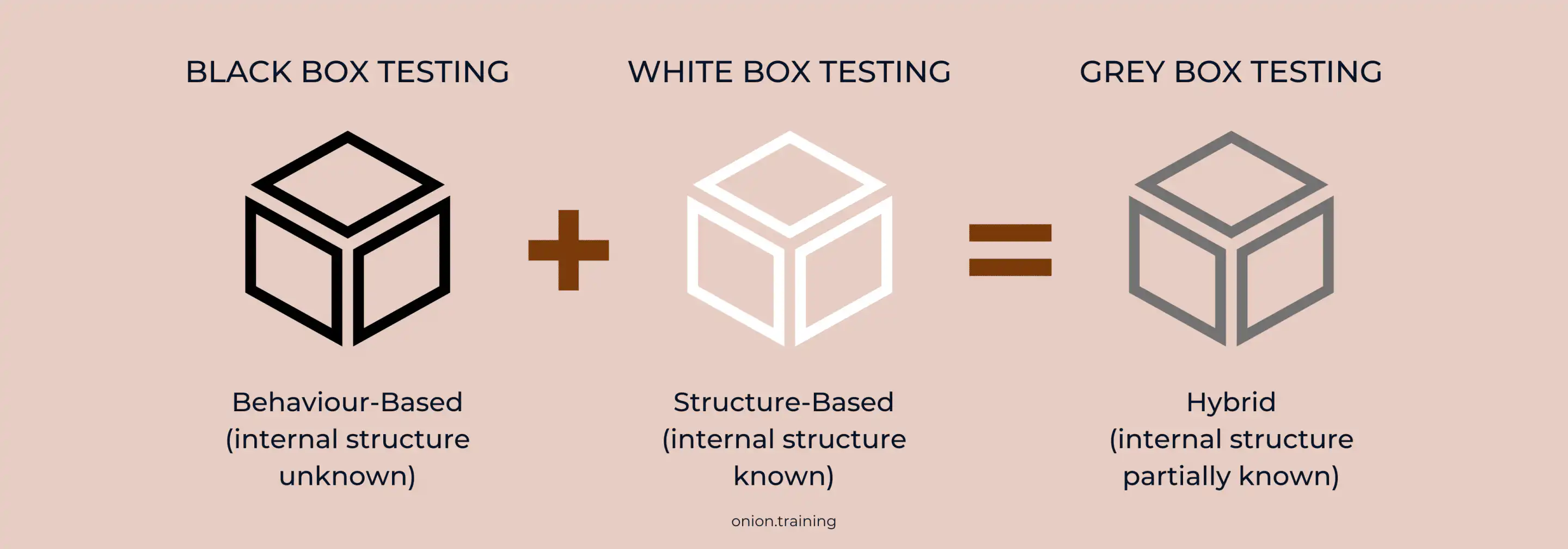
What is grey box testing? Grey box testing is a software testing method that combines elements of both black box and white box testing approaches, where testers have partial knowledge of the system's internal structure. You know what the internal components are, but you don’t necessarily know every detail of how those components interact.
It sits between black box testing (no internal knowledge) and white box testing (full internal knowledge). The name “grey box” comes from that middle ground: not fully black, not fully white. Testers may have access to architecture docs, schemas, or algorithms, but they still test externally, as users do.
Why Grey Box Testing Matters
A feature can look fine when tested in isolation, then fall apart where components connect. Grey box testing targets those integration points where black box can miss internal logic issues and white box can miss user-facing behaviour.
Take a banking app’s fund transfer feature. Black box testing confirms money moves between accounts. White box testing reviews the code that processes the transaction. Grey box testing checks the UI and the backend database together, confirming the displayed balance matches the database entry and that transaction logs capture everything correctly.
Core Objectives of Grey Box Testing
What is grey box testing trying to achieve? Several objectives shape how you use it.
- It combines the strengths of black box and white box testing. You get more insight than pure black box testing, without the full complexity and time cost of exhaustive white box testing.
- It improves software quality by testing through both user and developer lenses. This dual perspective increases test coverage and contributes to higher product quality.
- It reduces testing time compared to full white box testing. You don’t need to understand every line of code, only the key architecture and data flow.
- It supports earlier defect detection. With some visibility into internal processes, you can catch data flow issues, logic errors and security vulnerabilities before production.
The Grey Box Testing Process
The grey box testing process follows a structured approach where test cases are created based on algorithms that evaluate internal states, program behaviour and application architecture knowledge.
You start by identifying inputs using both white box and black box methods. That gives you a fuller view of what the system should accept and handle.
Next, you define the expected outputs for those inputs, so you can clearly spot failures.
You then identify the key paths that matter most, the critical routes data takes through your application.
For more complex systems, you identify sub-functions that need deep-level testing. These are the areas where partial internal knowledge pays off.
You create test cases for those sub-functions, execute them and verify outcomes. Then you repeat across other areas and retest after fixes.
Grey Box Testing Techniques
What is grey box testing composed of? Several techniques are common in grey box testing.
Matrix Testing
Matrix testing examines all variables in an application, where technical and business risks are defined by developers, and each variable is assessed according to the risks it presents. It’s a practical way to find unused or inefficient variables.
You list variables, rate the risk of each and test accordingly. Variables tied to financial data or authentication get heavier coverage than variables that store display preferences.
Regression Testing
Regression testing checks that changes or bug fixes haven’t broken existing behaviour. Every release can quietly damage something that used to work.
You build a suite of tests around core functionality. After each change, you run the suite to confirm that nothing has regressed. This is especially useful in continuous integration setups where changes happen often.
Pattern Testing
Pattern testing evaluates past defects to identify patterns that lead to defects. You use historical failures to predict future ones, then build tests that specifically guard against repeats.
If large file uploads have broken your system before, pattern testing makes sure size handling gets targeted coverage in new releases.
Orthogonal Array Testing
Orthogonal array testing is useful when you have multiple inputs and the combinations explode beyond what’s realistic to test. This technique uses statistics to create a set of test cases that provides good test coverage without the overhead of testing every possible combination.
Instead of thousands of combinations, you test a representative set designed to catch a high percentage of defects.
State Transition Testing
State transition testing checks how your system moves between states: logged in vs logged out, processing vs idle, connected vs disconnected.
You map the states, identify what triggers transitions, then test each transition to confirm it behaves correctly. This fits systems with complex workflows.
Decision Table Testing
Decision table testing focuses on how different combinations of inputs lead to outputs. You build a table of conditions and expected results.
For an online loan calculator, you test combinations of loan amount, interest rate and repayment period, then confirm the output matches what the decision table predicts.
Differences Between Testing Approaches
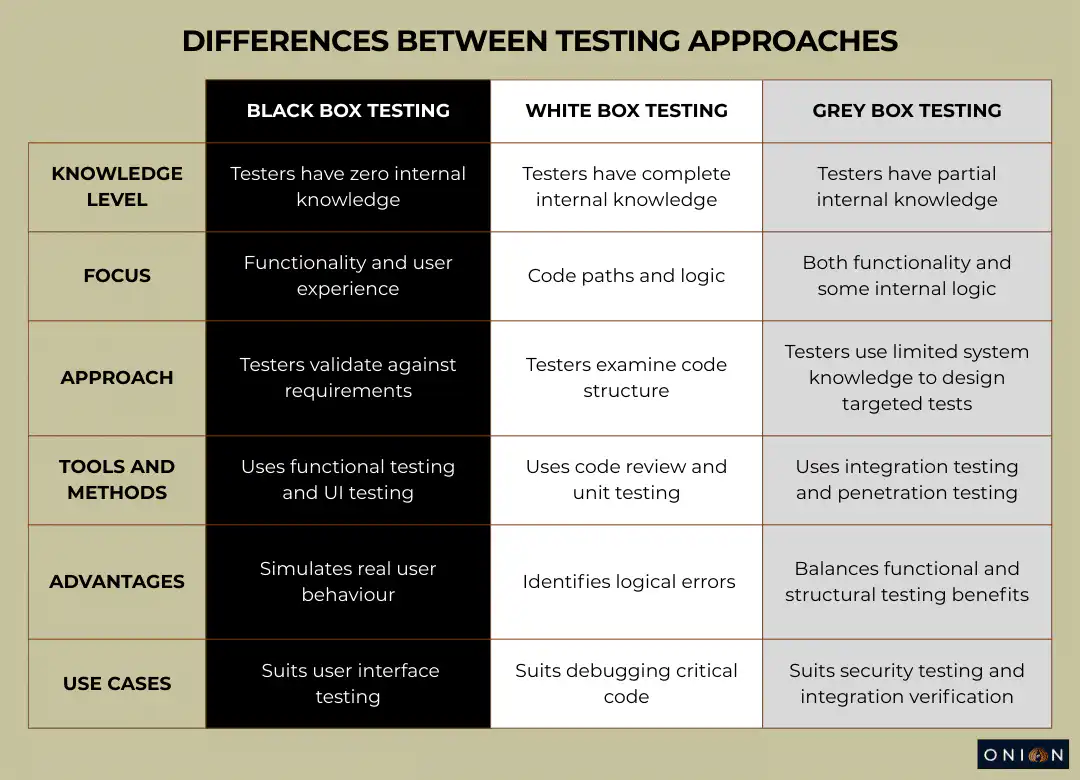
What is grey box testing compared to other methods? The contrasts make selection easier.
Advantages of Grey Box Testing
Grey box testing is attractive because it covers the “in-between” problems without demanding full code-level depth.
- Improved Test Coverage: Testers blend architectural awareness with functional focus. This dual perspective increases test coverage and contributes to higher product quality.
- Efficient Resource Use: Testers can use internal documentation (flowcharts, schemas) without needing full source access, which helps produce better-targeted scenarios.
- Early Defect Detection: Insight into both user behaviour and internal processing helps uncover issues earlier, especially around data flow, logic errors and security vulnerabilities. Earlier detection gives developers more time to fix defects before a release.
- Unbiased Testing: Testers aren’t deeply embedded in development, so they can spot issues without the “I know what the code meant” bias. The testing reflects experiences of potential attackers and users.
- Reduced Complexity: You avoid full white box complexity while getting more insight than black box alone.
- Better Integration Testing: It’s strong at validating how modules connect and communicate.
- Enhanced Security Assessment: Partial access to internal logic can expose vulnerabilities that black box testing may miss.
Limitations of Grey Box Testing
Grey box testing has trade-offs that matter in planning.
- Limited Code Access: Without full source or algorithm knowledge, tracing root causes can be hard, especially when defects live deep in complex logic.
- Dependency on Documentation: It relies on accurate internal documentation. Outdated or incomplete docs weaken results.
- Partial Coverage: It won’t provide the full code coverage of white box testing. Some paths can remain untested.
- Algorithm Testing Limitations: You can’t use grey box testing for algorithm testing because you don’t have a complete understanding of the implementation.
- Defect Isolation Challenges: In distributed systems, isolating defects gets harder when you can’t see every interaction.
- Test Case Design Complexity: Designing good tests requires balancing external behaviour checks with internal logic awareness, which can be difficult.
Practical Examples of Grey Box Testing
Example 1: E-Commerce Checkout Process
Testing checkout on an online shop shows grey box testing clearly.
You add items through the UI. With database knowledge, you confirm the cart updates correctly in the backend. You enter payment and delivery details through the UI. You verify payment gateway integration and confirm that payment details are encrypted. Finally, you check that the order is stored correctly and that confirmation emails trigger as expected.
This is user-focused testing, backed by internal data validation.
Example 2: Login Authentication
Login testing with partial knowledge of authentication internals is another classic grey box scenario.
You attempt login with valid and invalid credentials through the UI. You review backend logs to confirm invalid attempts are handled correctly and don’t leak sensitive information. You test session handling to confirm tokens are issued correctly and expire after logout. You verify brute force protection works.
It’s UX testing plus security checks using internal signals.
Example 3: File Upload Feature
File uploads are perfect for catching UI-to-backend cracks.
You upload different file types through the UI. You monitor server-side processing for validation and storage. You confirm UI error messages appear properly for invalid formats. You verify that uploaded files are stored securely and only accessible to authorised users.
That validates both the experience and the client-server handshake.
Tools for Grey Box Testing
Grey box testing is more about how you think than what you click, but tools help.
Testing Platforms
BrowserStack provides cloud-based testing across 3,500+ real device-OS-browser combinations, supporting manual and automated web and mobile testing. It integrates with Selenium, Playwright and Cypress for smoother workflows.
Automation Frameworks
Selenium automates web app testing across browsers and platforms. It supports multiple languages and CI/CD integration.
Appium automates mobile testing across Android, iOS and Windows for native, hybrid and mobile web apps.
API Testing Tools
Postman creates, tests and automates API workflows. It supports request building, automation and monitoring.
Browser Tools
Chrome DevTools supports real-time debugging and performance profiling, including network inspection and front-end analysis.
Security Testing Tools
Burp Suite supports security vulnerability detection with manual and automated tooling.
Programming Frameworks
JUnit supports unit testing Java with annotations and structured test cases.
NUnit supports unit testing in .NET with parameterised tests and flexible assertions.
Database Testing
DBUnit validates database interactions and data consistency, including seeding and cleanup.
Best Practices for Grey Box Testing
- Understand System Architecture: Learn the architecture, workflows and key components first, so test scenarios are grounded.
- Define Clear Objectives: Set goals like validating integrations, uncovering vulnerabilities, or verifying data flow.
- Combine Insights: Use internal knowledge plus external behaviour to build coverage that’s both broad and targeted.
- Use Appropriate Tools: Match tools to needs, Postman for APIs, Selenium for UI and so on.
- Focus on Integration Points: Prioritise module interaction zones, because defects cluster there.
- Test Security Vulnerabilities: Look for unauthorised access, weak session handling, improper data handling and similar gaps.
- Validate Data Flow: Confirm inputs produce correct outputs by checking logs, databases, or other internal traces.
- Automate Repetitive Tests: Automate frequently run checks to reduce effort and increase reliability.
- Document Findings: Record results with clear, actionable reporting for faster fixes.
- Retest After Fixes: Confirm fixes work and didn’t introduce new problems.
- Collaborate with Developers: Align priorities and clarify expected behaviour with the dev team.
- Create Clear Separation: Keep tester and developer roles distinct to reduce bias even when some internal knowledge is shared.
When to Use Grey Box Testing
What is grey box testing best suited for? These situations tend to benefit most.
- Integration Testing: It’s strong when validating how modules work together, using partial architecture knowledge to test interactions properly.
- Security Testing: In penetration testing, partial internal insight helps focus attacks and checks on realistic weak points.
- System Testing: It validates the full system against requirements by combining internal design awareness with external interaction testing.
- Web Application Testing: Grey box testing is particularly useful for web applications with distributed networks and no source code or binaries that would allow for white box testing.
- Regression Testing: When new changes are shipped, it helps confirm that the new code didn’t break existing features.
- Database Testing: It’s effective for validating that data is stored, retrieved and kept consistent.
Key Takeaways - What is Grey Box Testing?
- Grey box testing combines black box and white box testing methods, using partial knowledge of the internal structure to design targeted test cases
- Testers know what internal components exist, but not necessarily how they interact, striking a balance between external functionality testing and internal code analysis
- The approach improves test coverage by combining the developer's understanding of architecture with the tester's focus on functionality
- Common techniques include matrix testing, regression testing, pattern testing, orthogonal array testing, state transition testing and decision table testing
- Grey box testing excels at integration testing, security assessment, web application testing and finding defects at the intersection of code and user experience
- Benefits include improved test coverage, efficient resource use, early defect detection and enhanced security assessment
- Limitations include partial code access, dependency on documentation and difficulty isolating defects in distributed systems
- The method requires less technical expertise than white box testing, but provides more insight than black box testing alone
- Grey box testing combines unbiased external testing with informed internal validation
- Best practices include understanding system architecture, defining clear objectives, focusing on integration points and maintaining separation between testers and developers
Frequently Asked Questions - What is Grey Box Testing
Q1: What is grey box testing, and how does it differ from black box and white box testing?
Grey box testing is a software testing method where testers have partial knowledge of the internal structure, sitting between black box testing (no internal knowledge) and white box testing (complete internal knowledge). It combines elements of both approaches to identify defects due to improper structure or application usage. Black box testing focuses purely on inputs and outputs from a user perspective, white box testing examines code structure and logic, whilst grey box testing uses limited internal knowledge to design more informed tests, whilst still testing from outside the system.
Q2: When should you use grey box testing instead of other testing methods?
Grey box testing works best for integration testing, security assessment, web application testing and scenarios where you need to verify both functionality and internal data handling. It's particularly useful for testing web applications with distributed networks where you don't have access to source code or binaries. Use it when you need more insight than black box testing provides, but don't require the exhaustive code examination of white box testing. It's also ideal for penetration testing, where understanding some internal architecture helps identify vulnerabilities more effectively.
Q3: What techniques are used in grey box testing?
Common grey box testing techniques include matrix testing (examining all variables and associated risks), regression testing (verifying changes don't break existing functionality), pattern testing (analysing past defects to prevent similar issues) and orthogonal array testing (using statistics for optimal test coverage). Other techniques include state transition testing (verifying system behaviour across different states), decision table testing (examining responses to input combinations) and API testing (validating interface functionality). The choice of technique depends on the testing phase and how the application operates.
Q4: What are the main advantages of grey box testing?
Grey box testing combines a developer's understanding of system architecture with a tester's focus on functionality, increasing test coverage and improving product quality. It provides efficient resource use by requiring only partial internal documentation access rather than complete code knowledge. Early defect detection becomes possible with insight into both user behaviour and internal processes, giving developers more time to fix issues. The approach is unbiased because testers aren't deeply involved in development, providing testing that reflects real user and attacker experiences. It's less complex than white box testing, whilst offering more insight than black box testing.
Q5: What tools are commonly used for grey box testing?
BrowserStack provides cloud-based testing across 3,500+ real devices and browsers for both manual and automated testing, integrating with frameworks like Selenium, Playwright and Cypress. Selenium automates web application testing across multiple browsers and platforms. Appium handles mobile application testing for Android and iOS. Postman facilitates API testing and automation. Chrome DevTools offers real-time debugging and performance profiling. Burp Suite provides security vulnerability detection. JUnit and NUnit support unit testing for Java and .NET applications, respectively. DBUnit validates database interactions and data consistency.
Q6: What are the limitations of grey box testing?
Grey box testing has limited access to internal code, making it difficult to trace root causes of defects buried deep in complex logic. It depends on accurate internal documentation, so outdated or incomplete documentation reduces testing effectiveness. The approach doesn't provide comprehensive code coverage like white box testing, potentially leaving some code paths untested. You can't use it for algorithm testing because you lack a complete understanding of the internal implementation. Isolating defects becomes challenging in distributed systems where you can't see all component interactions. Test case design can be complex as it requires balancing external behaviour testing with internal logic understanding.
Q7: How does grey box testing improve software security?
Grey box testing improves security by simulating realistic attacks with partial knowledge of internal architecture. It helps uncover vulnerabilities in authentication, authorisation, encryption and session management more effectively than pure black box testing. The approach enables testing for insider threats like employees attempting to manipulate applications, and external threats like attackers exploiting vulnerabilities. With access to some internal documentation, you can target security-critical components while still testing from an attacker’s angle, which often exposes issues at integration points and within data flows.
Q8: What is the step-by-step process for performing grey box testing?
The grey box testing process starts by identifying inputs from both white and black box testing methods to get a complete picture. Next, identify probable outputs from these inputs. Identify key paths through the system requiring testing. For complex systems, identify sub-functions needing deep-level testing. Create inputs for these sub-functions and identify their probable outputs. Execute the sub-function test cases and assess the outcomes. Repeat these steps as you test different parts of the system. After fixes are implemented, retest to verify corrections and ensure no new issues have been introduced.
Q9: Can grey box testing be automated?
Yes, grey box testing can be automated using various tools and frameworks. Automation works well for regression testing, API testing and integration testing where you repeatedly verify the same functionality. Tools like Selenium, Appium and Cypress automate UI testing whilst allowing verification of backend processes. API testing tools like Postman support automated API validation. However, some areas, especially exploratory security work and complex integrations, still benefit from manual testing where human judgment matters most. The usual best fit is automation for repetition and manual testing for complexity.
Q10: How does grey box testing compare to penetration testing?
Grey box penetration testing applies grey box principles specifically to security assessment. It provides an unbiased, non-obtrusive approach where testers know what internal components exist but not how they interact, ensuring testing reflects potential attacker experiences. It differs from black box penetration testing, where there’s no internal knowledge, and from white box penetration testing, where testers have full access to code and architecture. Grey box sits in the realistic middle, reflecting scenarios where an attacker has gained some internal insight through reconnaissance or insider knowledge, which often makes it effective at identifying practical vulnerabilities.
Related articles