

You test a feature. It works. But your users still leave your application. Why?
The answer lies in what you didn't test. Speed. Security. Usability. These quality attributes exist outside traditional functional testing, yet they determine whether users stay or abandon your software.
This is what non-functional testing addresses.
What is Non-Functional Testing?
What is non-functional testing? It examines how well your system operates rather than what specific functions it performs.
Functional testing checks whether a login button works. Non-functional testing measures how quickly that login happens, whether it stays secure during the process and if 10,000 users can log in simultaneously without crashes.
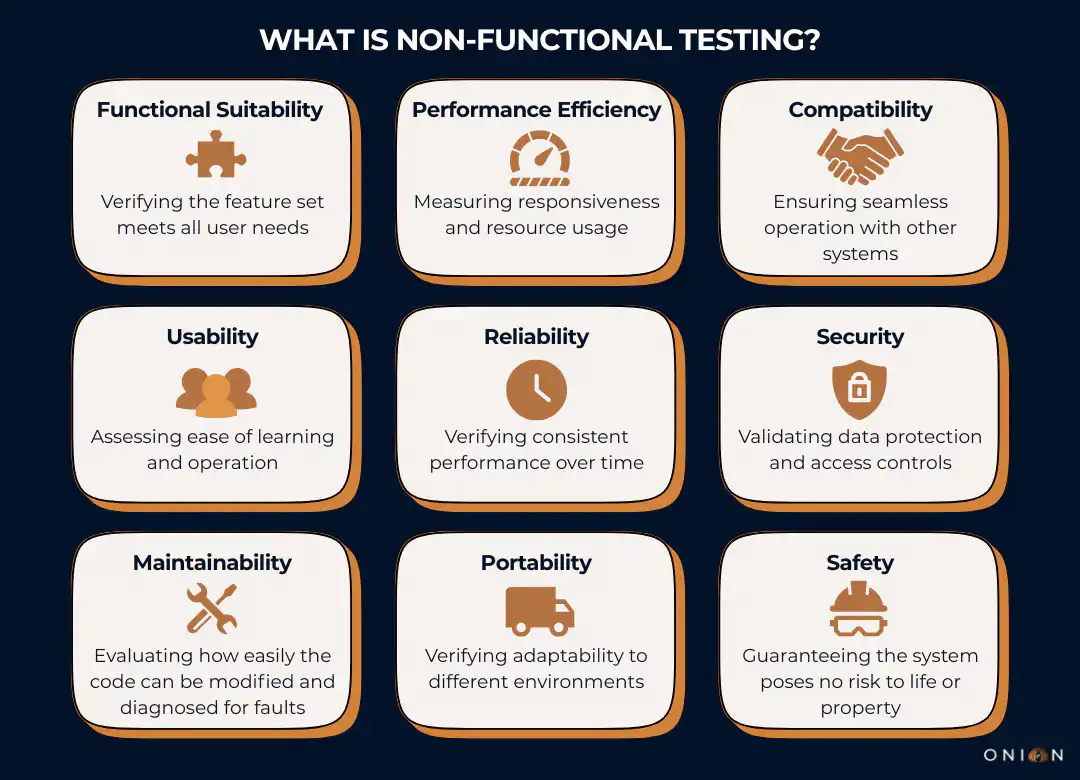
The standard ISO/IEC 25010:2023 defines nine core quality characteristics for the Product Quality Model, which is the basis for non-functional testing.
The nine core quality characteristics are:
- Functional suitability
- Performance efficiency
- Compatibility
- Usability
- Reliability
- Security
- Maintainability
- Portability
- Safety
These characteristics define how software behaves under real-world conditions.
You can build a perfectly functional checkout system. But if it takes 10 seconds to load, users will abandon their carts. Statistics from Google show that 53% of mobile users abandon sites that take longer than three seconds to load.
Why Non-Functional Testing Matters
Software failures cost businesses billions annually. But most failures don't stem from broken features. They come from performance bottlenecks, security vulnerabilities, or usability problems that functional testing never catches.
In 2011, Netflix faced a choice. They could wait for failures to happen in production, or they could test their system's ability to handle failures proactively. They chose the latter approach, creating Chaos Monkey, a tool that randomly shuts down production servers to test resilience.
The result? When Amazon Web Services experienced a major outage in 2012 that affected 10% of servers, Netflix continued streaming without interruption. Their non-functional testing approach, specifically resilience testing, prepared them for real-world failures before users experienced them. According to research published by Netflix engineers, this chaos engineering approach directly contributed to their industry-leading availability metrics.
Core Objectives of Non-Functional Testing
What is non-functional testing trying to achieve? Several key objectives drive this testing approach.
First, you want to verify that your software meets quality standards beyond basic functionality. This includes measuring response times, checking security controls and confirming the system handles expected load volumes. These measurements must be quantifiable - you need numbers, not subjective assessments.
Second, you aim to identify risks before deployment. Problems discovered during development cost significantly less to fix than issues found in production. IBM research shows that fixing a defect in production costs 4-5 times more than fixing it during development and 15-100 times more than fixing it during design.
Third, you gather actual data about system behaviour. This data helps you make informed decisions about architecture, infrastructure and capacity planning. Without concrete metrics, you're guessing.
Fourth, you verify compliance with non-functional requirements. Contracts often specify performance targets like "pages must load in under 2 seconds for 95% of users." Non-functional testing proves whether you meet these commitments.
Key Parameters in Non-Functional Testing
Several parameters define what you examine during non-functional testing. Each parameter addresses a specific quality attribute defined in ISO 25010.
Security measures protection against attacks from internal and external sources. This includes testing authentication mechanisms, encryption protocols, access controls and vulnerability to common exploits. Security testing verifies that your system protects data and maintains functionality as intended.
Reliability checks whether your system performs intended functions without failure over a specified period. Users expect consistent, error-free operation. According to ISO 25010, reliability encompasses maturity, availability, fault tolerance and recoverability.
Performance Efficiency examines how well your software handles capacity, quantity and response time. The ISO 25010 standard breaks this into time behaviour (response times), resource utilisation (CPU, memory, network usage) and capacity (maximum limits).
Usability evaluates how easily users can interact with your system. ISO 25010 defines six sub-characteristics: appropriateness, recognisability, learnability, operability, user error protection, user interface aesthetics and accessibility.
Compatibility tests your system's ability to exchange information with other systems whilst sharing the same hardware or software environment. This includes co-existence (functioning alongside other products) and interoperability (exchanging and using information with other systems).
Maintainability assesses how easily you can modify software to correct defects, improve performance, or adapt to changed environments. This includes modularity, reusability, analysability, modifiability and testability.
Portability determines how easily you can transfer software between environments. This covers adaptability, installability and replaceability.
Types of Non-Functional Testing
What is non-functional testing composed of? Multiple testing types fall under this umbrella, each focusing on specific quality attributes.
Performance Testing
Performance testing examines how your system behaves under various conditions. It identifies bottlenecks that could slow your application.
You measure specific metrics: response times, throughput rates and resource consumption. But here's what many testers miss - you shouldn't rely on average response times alone.
Performance testing experts recommend using percentiles instead. If your 95th percentile response time is 2 seconds, it means 95% of users experience response times of 2 seconds or less. This metric reveals more than averages because a few extremely slow requests can skew averages upward, whilst most users get fast responses.
For example, suppose you run 100 requests. Ninety-nine complete in 1 second, but one takes 100 seconds:
- The average is nearly 2 seconds - misleading
- The 95th percentile remains 1 second - accurate
Load Testing
Load testing checks how your application behaves when multiple users access it simultaneously. You measure system response under varying load conditions.
This testing simulates real-world usage patterns. You might test 100 concurrent users, then 1,000, then 10,000. The results show where your system reaches its limits.
Key metrics include:
- Requests per second the system can handle
- Response time degradation as load increases
- Error rates at different load levels
- Resource utilisation (CPU, memory, database connections)
Stress Testing
Stress testing pushes your system beyond normal operating conditions to find breaking points. You deliberately overload the system to see how it handles extreme situations.
This testing answers critical questions: What happens when you exceed the expected load by 200%? Does the system crash or degrade gracefully? How quickly does it recover after the stress ends?
For instance, an e-commerce site might normally handle 1,000 transactions per minute. Stress testing would simulate 3,000 or 5,000 transactions per minute to understand failure modes.
Security Testing
Security testing identifies vulnerabilities in your software. Testers look for weaknesses that attackers could exploit.
This includes:
- Authentication bypass attempts
- SQL injection vulnerabilities
- Cross-site scripting (XSS) flaws
- Insecure direct object references
- Security misconfiguration
- Sensitive data exposure
According to OWASP, the Open Web Application Security Project, these represent the most critical web application security risks. Security testing should check for all items on the OWASP Top 10 list.
Usability Testing
Usability testing evaluates how user-friendly your software is. This testing involves observing real users interacting with your application.
You identify confusing elements, navigation problems and areas where users struggle. The insights help you improve the overall user experience.
Effective usability testing measures:
- Time to complete common tasks
- Number of errors users make
- User satisfaction ratings
- Accessibility for users with disabilities
- Learning curve for new users
Reliability Testing
Reliability testing verifies your system operates without error under specified conditions for a defined period. You check whether your software consistently performs its intended functions.
For example, you might run your application continuously for 72 hours under normal load to verify it doesn't develop memory leaks, crash, or degrade over time.
Volume Testing
Volume testing examines how your system handles large amounts of data. You load databases with millions of records to test query performance and data processing capabilities.
This testing reveals whether your database indexes are efficient, whether queries slow down with large datasets and whether the system can handle data growth.
Scalability Testing
Scalability testing evaluates whether your system can grow or shrink to meet changing demands. You test both scaling up (adding resources to handle more load) and scaling out (adding more instances of your application).
Cloud-based systems particularly need scalability testing. Can you add servers dynamically as traffic increases? Does performance improve proportionally when you add resources?
Compatibility Testing
Compatibility testing verifies your software works across different browsers, operating systems, devices and configurations. Users access applications from various environments.
According to ISO 25010, compatibility testing ensures your system demonstrates co-existence (performs required functions whilst sharing resources with other products) and interoperability (exchanges information with other systems effectively).
You test across:
- Multiple browser versions (Chrome, Firefox, Safari, Edge)
- Different operating systems (Windows, macOS, Linux, iOS, Android)
- Various screen sizes and resolutions
- Different network conditions (3G, 4G, 5G, Wi-Fi)
The Significance of ISO/IEC 25010 (SQuaRE)
When discussing non-functional testing, you must understand the ISO/IEC 25010 standard, the international reference that defines software and systems Quality Models.
The concepts of software quality originally defined in the ISO/IEC 25010:2011 standard, which superseded the older ISO 9126, are foundational. While the 2011 edition has been withdrawn, its core framework remains the global reference.
The standard has since been refined and split into updated 2023 documents.
- The Product Quality Model is now defined in ISO/IEC 25010:2023. This updated standard outlines nine quality characteristics (up from eight in the 2011 version).
- The major change in the 2023 revision is the formal addition of Safety as a distinct characteristic, resulting in the nine core characteristics and their detailed sub-characteristics that describe software product quality.
- The Quality in Use Model has been separated into its own standard, ISO/IEC 25019:2023.
Why ISO/IEC 25010 is Critical
The power of this standard lies in its ability to provide a common, objective language for discussing quality. Instead of vague, subjective terms like "good performance," you can specify exact requirements using the standard's terminology.
For example, instead of saying "The system must be reliable," you can specify: "The system shall demonstrate Maturity (a sub-characteristic of Reliability) by operating for 720 consecutive hours under normal load with less than a 0.1% failure rate."
The standard distinguishes between two crucial aspects of quality:
- Product Quality: The intrinsic properties of the software (e.g., its Reliability, Performance Efficiency and Maintainability).
- Quality in Use: How well the software serves users in specific contexts to achieve goals (e.g., Effectiveness and Satisfaction).
Both models matter, but they require different testing approaches. For the most current information and guidance on defining and using these models, you should use the updated 2023 documents, guided by ISO/IEC 25002:2024.
Benefits of Non-Functional Testing
The advantages of conducting thorough non-functional testing are significant.
Improved Performance: Non-functional testing identifies bottlenecks before users experience them. You discover slow database queries, inefficient algorithms and resource-intensive processes during development.
Enhanced User Experience: Testing usability and performance ensures users have smooth interactions with your software. Applications that load quickly and work intuitively receive higher satisfaction ratings and better retention.
Increased Security: Security testing protects your application from attacks and data breaches. You identify vulnerabilities before attackers exploit them.
Better Reliability: Testing recovery procedures and system stability ensures your software remains available when users need it. Downtime costs money and damages reputation.
Cost Reduction: Identifying and resolving issues during testing is far less expensive than addressing production incidents. IBM research shows the cost multiplier for production defects is 15-100 times higher than design-phase fixes.
Regulatory Compliance: Many industries have specific non-functional requirements. Financial services need strict security. Healthcare requires data privacy. E-commerce demands availability. Non-functional testing proves compliance.
Challenges and Limitations
What is non-functional testing's downside? Like any process, it comes with challenges.
Resource Intensive: Comprehensive non-functional testing requires significant infrastructure. Load testing might need hundreds of virtual users. Security testing requires specialised tools and expertise. This demands budget and time.
Environment Complexity: Setting up realistic test environments that mirror production conditions can be technically challenging. Differences in hardware, network configuration, or data volumes produce misleading results.
Quantification Requirements: Non-functional testing must be quantifiable. Vague requirements like "the system should be fast" don't work. You need specific, measurable criteria, which can be difficult to define early in development.
Continuous Testing Needs: Software changes constantly. Each update requires re-testing to ensure quality standards are maintained. This ongoing requirement needs sustained investment.
Skill Requirements: Effective non-functional testing requires specialised skills. Performance testing needs an understanding of statistics and percentiles. Security testing demands knowledge of attack vectors. Not every team has these skills readily available.
Best Practices for Non-Functional Testing
Success with non-functional testing requires following proven practices.
Start Early: Don't wait until just before release to begin performance or security testing. Early testing catches issues when they're cheapest to fix. Integrate non-functional testing into your continuous integration pipeline.
Define Clear, Measurable Requirements: Instead of "the system should be fast," specify "pages must load in under 2 seconds for 95% of users." Concrete targets make testing objective and results actionable. Use percentiles rather than averages for performance requirements.
Test in Realistic Environments: Your test environment should mirror production conditions as closely as possible. Use production-like data volumes, similar hardware specifications and equivalent network conditions.
Automate Wherever Possible: Tools like Apache JMeter for performance testing, OWASP ZAP for security testing and Selenium for compatibility testing save time and provide consistent results. Automation enables regular testing with each code change.
Monitor Continuously: Non-functional testing isn't a one-time activity. Set up monitoring to track performance metrics, security events and availability in production. This ongoing observation catches issues before they become critical.
Prioritise Based on Risk: Not every parameter needs the same level of testing. Focus intensive efforts on areas most critical to your users and business. An e-commerce site might prioritise performance and security, whilst internal tools might emphasise usability and reliability.
Use Percentiles, Not Averages: When measuring performance, avoid relying on average response times. Performance testing experts recommend 90th, 95th and 99th percentiles. These metrics reveal how most users experience your system, not just the mathematical average.
Common Tools for Non-Functional Testing
Different testing types require specialised tools.
Performance and Load Testing:
- Apache JMeter (open source, industry standard)
- LoadRunner (enterprise solution)
- Gatling (modern, code-based approach)
Security Testing:
- OWASP ZAP (open source security scanner)
- Burp Suite (comprehensive security testing platform)
- Nessus (vulnerability scanner)
Usability Testing:
- UserTesting (real user feedback platform)
- Hotjar (heatmaps and session recordings)
- Maze (rapid usability testing)
Compatibility Testing:
- BrowserStack (cross-browser testing platform)
- Sauce Labs (cloud-based testing infrastructure)
- LambdaTest (browser and device compatibility)
Chaos Engineering:
- Chaos Monkey (Netflix's tool for resilience testing)
- Gremlin (comprehensive chaos engineering platform)
- Chaos Toolkit (open source chaos experiments)
Characteristics of Effective Non-Functional Testing
What is non-functional testing when done well? Several characteristics define effective approaches.
Measurable and Quantifiable: You need specific metrics to evaluate success or failure. Response time in milliseconds, number of concurrent users supported, and percentage of successful transactions are all concrete measurements.
Comprehensive: Don't just test performance and ignore security. A complete approach ensures you catch issues across all critical quality attributes defined in ISO 25010.
Reproducible: If you run the same test twice under identical conditions, you should get similar results. Reproducibility builds confidence in your findings.
Realistic: Your tests should reflect actual usage patterns, real data volumes and genuine user behaviours. Academic exercises provide little value.
Risk-Based: Focus testing efforts on the highest-risk areas. A banking application needs extensive security testing. A streaming service requires thorough performance and scalability testing.
Key Takeaways - What is Non-Functional Testing?
- Non-functional testing examines how well a system operates, not what functions it performs. It evaluates quality attributes like performance, security, usability and reliability.
- ISO 25010, the international standard framework for software quality, defines eight core characteristics and 31 sub-characteristics that guide non-functional testing.
- Real-world cases like Netflix's chaos engineering demonstrate how proactive non-functional testing prevents production failures, and their resilience testing enabled them to maintain service during major AWS outages.
- Use percentiles (90th, 95th, 99th) rather than averages when measuring performance. A 95th percentile response time of 2 seconds means 95% of users experience that speed or better.
- Early integration of non-functional testing into development cycles can reduce costs.
- Automation enables continuous non-functional testing.
- Test environments must mirror production conditions. Differences in hardware, data volumes, or network configuration produce misleading results.
- Security testing should cover OWASP Top 10 vulnerabilities, including injection flaws, authentication issues and sensitive data exposure.
- Load testing reveals system behaviour under concurrent user access.
- Quantifiable requirements are essential. Specify "pages must load in under 2 seconds for 95% of users" instead of vague goals like "should be fast".
Frequently Asked Questions - What is Non-Functional Testing?
Q1: How does non-functional testing differ from functional testing in software development?
Functional testing verifies that features work according to requirements; for example, checking if a login button successfully authenticates users. Non-functional testing examines quality attributes like how quickly that login occurs, whether it remains secure and if the system handles thousands of simultaneous login attempts. According to ISO 25010, functional testing addresses what the system does, whilst non-functional testing evaluates how well it performs under various conditions.
Q2: What metrics should you use to measure performance in non-functional testing?
Use percentiles rather than averages for accurate performance measurement. Performance testing research shows that 90th, 95th and 99th percentile response times reveal how users actually experience your system. If your 95th percentile is 2 seconds, 95% of users get responses in 2 seconds or less. Averages can mislead because a few extremely slow requests skew results upward. Also measure throughput (requests per second), error rates and resource utilisation (CPU, memory, network bandwidth). Define specific targets like "response time must be under 2 seconds for 95% of requests" rather than vague goals.
Q3: When should non-functional testing begin in the software development lifecycle?
Non-functional testing should start early in development, not just before release. Integrate it into your continuous integration pipeline so each code change triggers automated tests. Research on Netflix's development practices shows that early, continuous testing identifies issues when they're cheapest to fix. Define non-functional requirements during the design phase, establish baseline metrics when core features are implemented and monitor continuously through development and production.
Q4: What are the most critical types of non-functional testing for web applications?
For web applications, prioritise performance testing, security testing, compatibility testing and usability testing. Performance testing ensures pages load quickly—Google research shows 53% of mobile users abandon sites taking over 3 seconds to load. Security testing identifies vulnerabilities from the OWASP Top 10 list, including injection flaws and authentication issues. Compatibility testing verifies your application works across browsers, devices and operating systems. Usability testing ensures users can navigate and complete tasks efficiently. The specific priorities depend on your application's purpose - e-commerce sites need robust performance and security, whilst internal tools might emphasise usability.
Q5: How do you create realistic test environments for non-functional testing?
Mirror your production environment as closely as possible. Use similar hardware specifications, equivalent data volumes and comparable network conditions. For cloud-based applications, test in the same cloud regions you'll deploy to. According to ISO 25010 implementation guidance, environment differences produce unreliable results. Use production data or realistic synthetic data - testing with empty databases doesn't reveal performance issues. For load testing, simulate actual user behaviour patterns rather than uniform load.
Q6: What tools are essential for non-functional testing?
Essential tools include Apache JMeter or LoadRunner for performance and load testing, OWASP ZAP or Burp Suite for security testing, BrowserStack or Sauce Labs for compatibility testing and UserTesting or Hotjar for usability testing. Netflix's chaos engineering approach demonstrates the value of resilience testing tools like Chaos Monkey or Gremlin. Choose tools that integrate with your CI/CD pipeline for automation. Open source options like JMeter and OWASP ZAP provide powerful capabilities without licensing costs. For enterprises, commercial tools offer additional features and support. The right tool combination depends on your specific testing needs and budget.
Q7: How do you define quantifiable requirements for non-functional testing?
Replace vague statements with specific, measurable criteria. Instead of "the system should be fast," specify "page load time must be under 2 seconds for the 95th percentile of requests." For security, define requirements like "the system shall prevent SQL injection attacks as verified by OWASP ZAP scans." For reliability, specify "the system shall maintain 99.9% uptime measured monthly." According to ISO 25010 standards, use the framework's eight quality characteristics to structure requirements. Include measurement methods, acceptance criteria and testing conditions. Collaborate with stakeholders to understand business needs and translate them into technical metrics.
Q8: What role does ISO 25010 play in non-functional testing?
ISO/IEC 25010 provides the international standard framework for software quality. It defines eight product quality characteristics. This standard gives teams a common language for discussing quality requirements and testing approaches. When you specify that your system must demonstrate "maturity" (a reliability sub-characteristic), everyone understands you're referring to the system's ability to meet reliability needs under normal operation.
Q9: How frequently should non-functional testing be performed during development?
Non-functional testing should happen continuously, not just before major releases. Run automated performance, security and compatibility tests with each code commit through your CI/CD pipeline. Conduct comprehensive load tests weekly or when significant changes affect system architecture. Perform security scans daily using automated tools. Schedule full compatibility testing when you add new features or browser versions. Monitor production systems continuously to catch real-world issues. The frequency depends on your release cycle and risk tolerance - higher-risk applications need more frequent testing.
Q10: What are the main differences between load testing, stress testing and performance testing?
Performance testing is the umbrella term covering all testing types that measure system behaviour under various conditions. Load testing specifically checks how the system behaves under expected and peak user loads; for example, testing at 1,000, 5,000 and 10,000 concurrent users to understand capacity limits. Stress testing pushes the system beyond normal limits to find breaking points - if your peak load is 5,000 users, stress testing might simulate 15,000 users to see when and how the system fails. According to performance testing best practices, load testing answers "can we handle expected traffic?" whilst stress testing answers "what happens when we exceed capacity?" Both use similar tools but different testing scenarios and objectives.