

You've built two modules. Both work beautifully on their own. Then you connect them, and everything breaks.
Sound familiar?
This happens more often than anyone likes to admit. Your login module works. Your payment processor works. Put them together? Suddenly, users can't complete transactions. The culprit isn't the code itself; it's how the pieces talk to each other.
That's the entire point of integration testing.
Understanding What is Integration Testing
So what is integration testing, exactly? It's a testing technique that checks whether different modules, components, or services actually work together properly. You're not looking at individual functions anymore (that's unit testing). You're examining how they interact, share data and communicate.
It involves taking modules that have passed unit testing, grouping them into larger aggregates, and testing them together. You're looking for problems in the interfaces, the handshakes between components.
Imagine building a car. You've tested the engine separately. The transmission works fine on its own. The brakes? Perfect. But will the engine talk to the transmission correctly? Will the brakes actually respond when the driver presses the pedal?
Why Integration Testing Matters
Components that work brilliantly in isolation can completely fall apart when you combine them.
The money involved when it all goes wrong is staggering. The Consortium for Information & Software Quality found that poor software quality costs the United States $2.41 trillion every year. A huge chunk of that comes from integration failures; bugs that only show up when components start talking to each other.
And here's something that'll make you wince: fixing a bug can get eye-wateringly more expensive the later you find it. Catch an integration issue during development? Relatively cheap. Find it in production? You're looking at potentially massive costs in fixes, customer churn and reputation damage.
This is why developers keep pushing "shift-left testing” - catching defects as early as possible to save everyone time, money and stress.
What is Integration Testing Looking For?
When you're doing integration testing, you're checking several things that can go wrong when components connect:
Interface Compatibility: Can these modules actually talk to each other? If one's expecting JSON and another sends XML, you've got a problem. Method signatures need to match. Data formats need to align. Protocols need to be compatible.
Data Flow Accuracy: Information travels through your system from point A to point B, getting processed along the way. Integration testing ensures this data journey completes correctly and that nothing is lost, corrupted, or delivered to the wrong place.
Communication Protocols: Different components need to follow agreed-upon rules for talking to each other. Are they synchronising properly? Is data transmission secure? Integration testing verifies that the conversation works.
Dependency Management: Modules often need other modules to function. These interdependencies need to be verified before they bite you in production.
Error Handling: What happens when something goes wrong? If one component fails, does the error get handled properly? Does it propagate correctly through the system? Does it trigger appropriate responses?
Get any of these wrong, and you've got bugs that only appear when the system runs as a whole.
How Integration Testing Differs from Other Testing Types
People get confused about what integration testing is versus other testing methods. Let's clear that up because it matters for how you allocate your testing time.
Unit Testing vs Integration Testing: Unit tests look at individual functions or methods in complete isolation. CircleCI explains that unit testing deliberately avoids side effects - you're testing each piece in a vacuum. Integration testing does the opposite. You want to see side effects. You want to see what happens when things interact in the real world.
Integration Testing vs System Testing: Integration testing focuses on how specific modules interact with each other. System testing validates the entire application from end to end. Integration testing sits above unit testing and below system testing.
Integration Testing vs End-to-End Testing: End-to-end testing simulates complete user journeys through your whole system. Integration testing has a narrower focus. You're examining how specific components work together, not testing the full user experience from login to logout.
Integration Testing Approaches
Development teams can choose from several strategies for conducting integration testing. Each approach offers different advantages depending on project requirements.
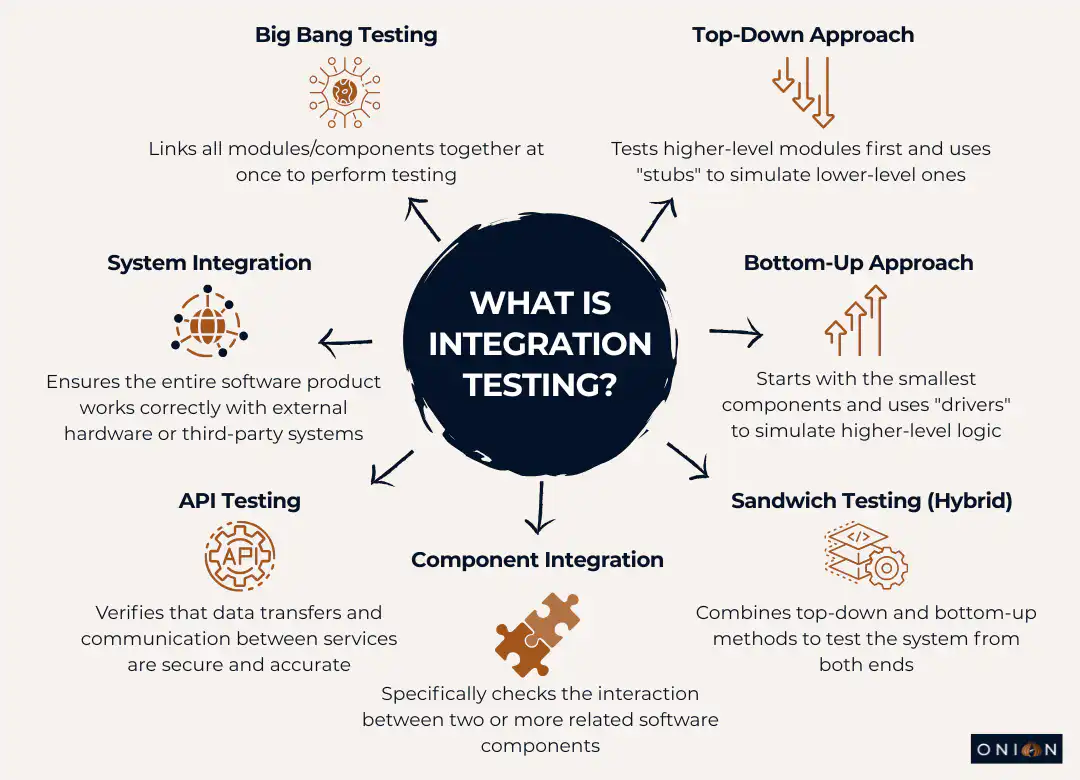
Big Bang Integration Testing
Big Bang testing is exactly what it sounds like. You take all your modules, combine them at once and test the whole thing together. This approach best suits small systems.
Advantages:
- Dead simple to set up with minimal coordination needed
- Fast to implement if you've got a small project
- Less initial management effort
Disadvantages:
- Good luck isolating defects when everything's connected at once
- You can't start testing until every single component is finished
- Debugging becomes a nightmare in large systems
- You find defects late, which means expensive fixes
Incremental Integration Testing
Incremental testing takes a smarter approach. You integrate and test modules gradually, adding components step by step. This lets you catch bugs earlier because you're examining things in smaller chunks.
Bottom-Up Testing: You start with the lowest-level modules and work your way up. When higher-level modules aren't ready yet, you use "drivers" - temporary code that simulates what those missing components would do.
Say you're building a flight booking app. Bottom-up testing would start with the payment and booking modules, then integrate the flight search functionality, moving upwards through the system.
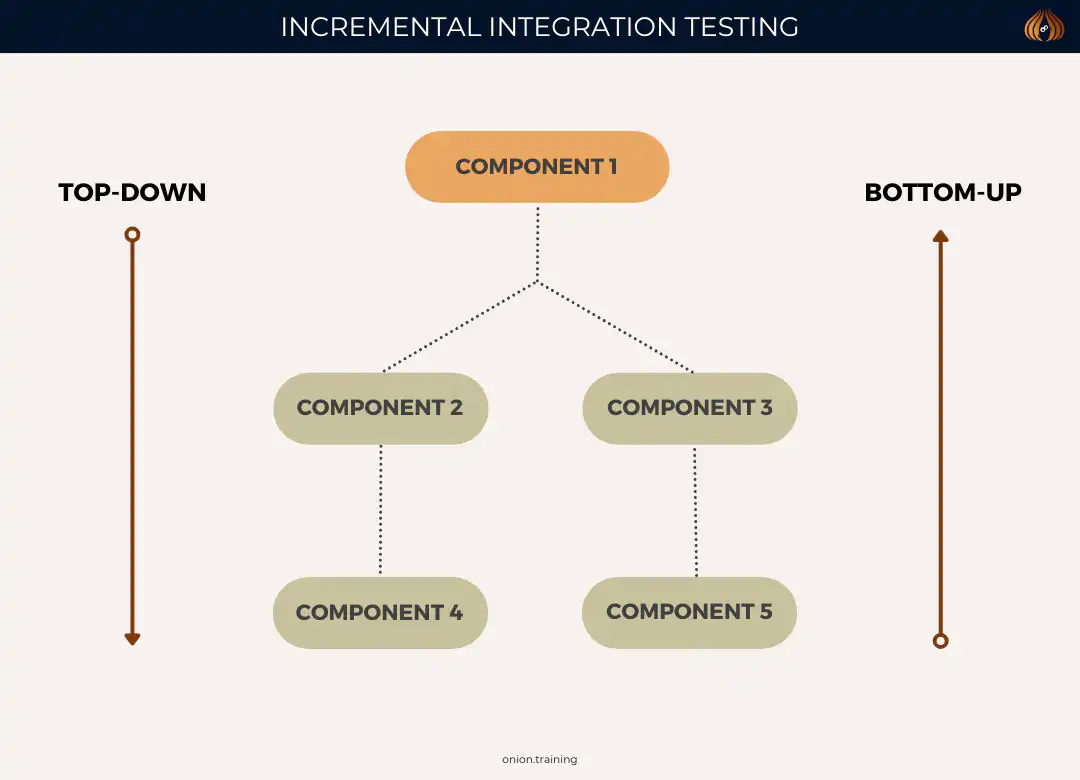
Top-Down Testing: This flips it around. You begin with high-level modules and work down through the system. "Stubs" replace lower-level modules that aren't complete yet, pretending to be those components.
Using that same flight booking example, top-down testing would start with the flight search interface, then gradually integrate the booking and payment components below it.
Sandwich (Hybrid) Testing: This approach uses both methods at the same time. You're testing from both directions - top-down and bottom-up, meeting somewhere in the middle. This combines the benefits from both approaches and makes interface testing faster, though it does add complexity.
Most teams end up using some variation of incremental testing because it's just more practical than Big Bang for anything beyond tiny projects.
Designing Effective Integration Test Cases
Creating good integration tests takes planning. You can't just throw tests together and hope they catch problems. Here’s a structured approach:
Identify Integration Points: Start by figuring out where modules interact or depend on each other. These interfaces are your primary testing targets.
Define Test Objectives: Be clear about what each test should achieve. Are you checking if data flows correctly? Testing what happens under weird conditions? Know your goal before you write the test.
Create Realistic Scenarios: Tests need to reflect how people actually use your system. Include normal interactions, but don't forget edge cases - those unusual conditions where things might break.
Document Expected Results: Write down what should happen for each test. When a test fails, this documentation becomes essential for troubleshooting.
Consider Environmental Factors: Integration tests often need specific setups; particular database states, network conditions and external services being available. Plan for these requirements upfront.
Integration Testing Best Practices
You can follow certain practices to make your integration testing more effective without blowing your budget.
Start Testing Early
Start integration tests early in development. You'll catch issues when they're cheaper to fix, get valuable feedback on system quality faster and support iterative development better.
The numbers are brutal. According to the IBM System Science Institute, fixing defects during implementation costs six times more than fixing them during design. During testing? Fifteen times more. Once the software hits production? One hundred times more.
Read that again. A bug that costs £100 to fix during design costs £10,000 to fix in production. That's not a typo.
Test in Small Batches
Test smaller chunks of code. When something breaks, you'll find the problem faster. Trying to debug a massive integrated system? Good luck figuring out which component caused the issue.
Automate Where Appropriate
ScienceDirect points out that automation is critical for integration testing, especially in continuous integration environments. Automated pipelines combine unit tests with integration tests, failing the build if any test fails.
Tools like Jenkins and Travis CI run tests automatically, give you rapid feedback, and help you catch faults early. This improves software quality without requiring manual test runs every time someone commits code.
Choose the Right Approach
Your project characteristics determine which integration testing strategy works best. Look at system size, how modules depend on each other, your timelines and team resources. Pick Big Bang, incremental, or hybrid based on what actually makes sense for your situation - not what sounds good in theory.
Maintain Comprehensive Documentation
Document everything: test plans, expected results, actual results, discrepancies. You need repeatability. You need records for compliance. You need this documentation when something goes wrong six months later.
Handle Test Data Carefully
Integration tests that change databases or persistent storage need careful design. You can't have one test messing up data for the next test. Here are several techniques:
- Use teardown methods built into your testing framework
- Implement try-catch-finally exception handling
- Use database transactions with atomic operations
- Take database snapshots before tests and roll back after
- Initialise databases to clean states before each test
Pick what works for your setup, but pick something. Tests that depend on external state are tests waiting to fail randomly.
Common Integration Testing Challenges
Let's talk about what actually goes wrong in integration testing. Knowing these issues helps you prepare solutions before you hit them.
Managing Test Dependencies
Modern apps depend on external services, databases and third-party APIs. This creates headaches when services aren't available, need authentication, or have usage limits that interfere with testing.
Solutions? Use service virtualisation. Create mock services. Maintain dedicated test environments with controlled dependencies. Pick what fits your constraints.
Handling Timing and Synchronisation Issues
Asynchronous operations, network latency and concurrent processes; all of these can make tests fail randomly.
These failures waste time, erode confidence in your test suite, and eventually train everyone to ignore test failures. Fix flaky tests immediately.
Balancing Coverage and Maintenance
Too many integration tests become impossible to maintain. Microsoft Engineering warns that excessive mocking slows test suites down. It might mean you need different testing approaches, like acceptance testing or end-to-end testing instead.
You can't test everything. Focus on critical paths and high-risk integrations.
Coordinating Team Efforts
Integration testing often needs collaboration across multiple teams. Different developers build different modules, potentially on different schedules. Getting integration testing done requires actual communication, shared understanding of interfaces and agreed testing schedules.
This is often harder than the technical work.
Integration Testing Tools and Frameworks
Numerous tools support integration testing across different technology stacks:
For Java: JUnit, TestNG, Spring Test
For Python: pytest, unittest, Robot Framework
For JavaScript/Node.js: Jest, Mocha, Cypress
For .NET: NUnit, xUnit, MSTest
For API Testing: Postman, REST Assured, SoapUI
Continuous integration platforms like Jenkins, Travis CI, CircleCI, and GitHub Actions automate integration test execution, providing rapid feedback to development teams.
Real-World Integration Testing Examples
Theory is one thing. Let's look at what integration testing is in actual projects.
Banking Application: Testing interactions between front-end interfaces, transaction processing and backend databases. When someone transfers money, integration tests verify that the transaction processes are correct, account balances update accurately, and transaction details are recorded consistently everywhere.
Miss this testing? Customers see money leave their account, but it never arrives at the destination. Not good.
E-commerce System: Integration testing validates communication between product catalogues, shopping carts, payment gateways and fulfilment systems. Unit testing might confirm that carts calculate totals correctly. But integration testing checks whether the product catalogue gives accurate item details, the cart passes correct data to payment gateways, and payment responses trigger proper fulfilment logic.
Get any link in this chain wrong, and customers can't complete purchases. You'll see abandoned carts and lost revenue.
CRM Software: Testing ensures that contact management, email marketing and analytics modules communicate smoothly. Integration tests verify contacts sync correctly across systems, email campaigns trigger appropriately based on customer actions and analytics data is generated accurately from all the interactions.
When these integrations break, your marketing team makes decisions based on incomplete or incorrect data. Your sales team works with outdated contact information. Customers receive duplicate or mistimed emails.
Integration Testing in Modern Development
Software development has changed. Integration testing had to change with it.
Continuous Integration and Integration Testing
CI/CD pipelines treat integration testing as fundamental. Automated build and test pipelines combine unit tests from developers with integration tests from QA teams. When any test fails, the build fails. No exceptions.
This catches integration problems immediately instead of days or weeks later.
Microservices Architecture
Microservices have made integration testing more important and more complicated. You've got services built independently by different teams, using different technologies, deployed separately. They all need to interact reliably.
What is integration testing in this world? It's verifying service contracts, API compatibility, data format agreements and resilience when services fail. Contract testing becomes particularly important - verifying service interfaces match expectations without needing every service running simultaneously.
Test Pyramid Strategy
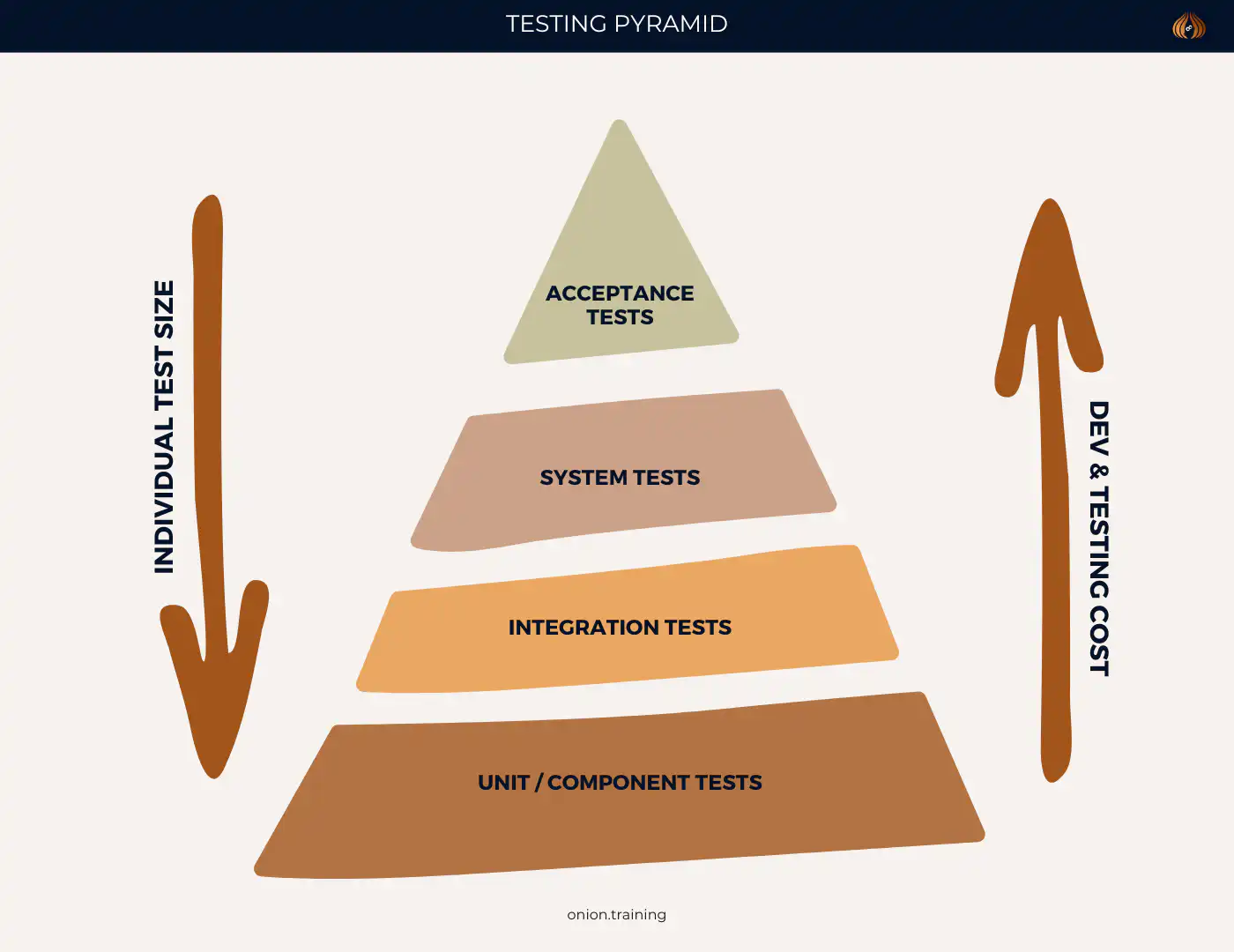
Integration testing sits in the middle layer of the test pyramid. Most organisations allocate 15-20% of testing effort to integration testing. You've got lots of fast unit tests at the base. Fewer comprehensive end-to-end tests at the top. Integration testing fills the middle ground.
Measuring Integration Testing Success
You need metrics to know if your integration testing actually works. Here's what to track:
Defect Detection Percentage: Idea Link recommends tracking the percentage of defects you find during testing versus production. Higher detection percentages mean you're catching problems before customers see them.
Test Coverage: Measure what percentage of integration points your tests cover. You won't hit 100% coverage - that's just unrealistic and probably unnecessary. But tracking coverage trends shows where you've got gaps.
Defect Density: Monitor defects per thousand lines of code or per feature. If density decreases over time, your testing is improving.
Test Execution Time: Balance thorough testing against development speed. Tests that take hours to run slow everything down. You want comprehensive testing that still gives rapid feedback.
Test Maintenance Effort: Track time spent maintaining tests versus creating new ones. High maintenance effort suggests your tests need refactoring or better design. You shouldn't spend more time fixing tests than writing them.
The Cost of Inadequate Integration Testing
Skip integration testing, and you'll pay for it. The numbers are worse than you think.
Integrate.io found that 84% of system integration projects fail or partially fail. Often because teams underestimated complexity and skipped proper testing.
Aspire Systems reports that 72% of users abandon apps after encountering just two bugs. In 2024, businesses lost $3.1 trillion annually due to poor software quality. 40% of companies experienced at least one critical software failure every quarter.
Think about that. Nearly half of all companies have a critical failure every few months.
Customer churn is the hidden cost. Perforce reveals that 60% of customers stop doing business with a company after one bad experience. 90% of app users abandon applications because of poor performance.
You don't get a second chance to make a first impression. Integration bugs create terrible first impressions.
Getting Started with Integration Testing
New to integration testing? Here's how to start without getting overwhelmed:
- Map Your System Architecture: Draw out your components and how they interact. Identify where things connect. These connection points are where integration testing focuses.
- Prioritise Based on Risk: Not every integration matters equally. Focus first on critical paths - the ones where failures would seriously impact users or business operations. Payment processing? Critical. Obscure admin feature used once a month? Less critical.
- Start with Happy Paths: Get basic successful scenarios working before you test error conditions and edge cases. Walk before you run.
- Build Incrementally: Don't try comprehensive integration testing from day one. Add tests gradually as you understand the system better. Your first integration test doesn't need to be perfect.
- Invest in Automation Early: Automated integration tests give rapid feedback and enable continuous testing. Set up automation infrastructure early, even if you only have a few tests initially.
- Establish Testing Environments: Create stable environments that mimic production. You need reliable, repeatable testing. Flaky environments produce flaky tests.
- Collaboration: Integration testing requires cooperation across teams. Set up communication channels. Build shared understanding of integration points. Talk to each other.
Key Takeaways - What is Integration Testing?
- What is integration testing? It's the process of testing how different software modules, components, or services work together as a unified system
- Integration testing sits between unit testing and system testing in the test pyramid, focusing specifically on component interactions rather than isolated functions or complete user journeys
- Poor software quality costs the US economy $2.41 trillion annually, with integration failures representing a significant portion of these costs
- Fixing bugs found during integration testing costs 15 times more than catching them during design, whilst production fixes cost 100 times more
- Three main approaches exist: Big Bang (testing all components at once), Incremental (gradual integration), and Sandwich/Hybrid (combining top-down and bottom-up methods)
- Starting integration testing early in the development cycle saves significant time and money by catching defects when they're cheaper to fix
- Effective integration testing requires careful planning, including identifying integration points, defining test objectives, and creating realistic test scenarios
- Automation proves critical in modern development, particularly within CI/CD pipelines that run integration tests automatically
- Common challenges include managing test dependencies, handling timing issues, balancing coverage with maintenance, and coordinating across teams
- Integration testing has become essential in microservices architectures where independently-built services must interact reliably
Frequently Asked Questions - What is Integration Testing?
Q1: When should integration testing be performed in the software development lifecycle?
Integration testing typically happens after unit testing and before system testing. But in Agile and DevOps environments? It happens continuously throughout development. You can run integration tests before or after unit tests; there's no rule saying you must wait. The key is testing integrated components as soon as you combine them. Early defect detection saves money and headaches.
Q2: How much should organisations budget for integration testing?
QA typically eats 20-40% of total development budgets. Integration testing represents 15-20% of the overall testing effort according to the test pyramid model. Your exact allocation depends on system complexity, risk tolerance, and regulatory requirements. Companies with mature testing practices shift spending from fixing production disasters toward prevention and testing. Ultimately, this reduces total quality-related expenses.
Q3: Can integration testing replace unit testing or end-to-end testing?
No. These testing types serve different purposes. They complement each other; they don't replace each other. Unit testing checks that individual components work in isolation. Integration testing confirms components interact properly when combined. End-to-end testing validates complete user journeys through the entire system. You need all three levels. The test pyramid suggests lots of unit tests, fewer integration tests, and even fewer end-to-end tests.
Q4: What's the difference between integration testing and API testing?
API testing is actually a type of integration testing. It focuses specifically on testing APIs. API testing verifies APIs function correctly, handle requests and responses properly, validate data, manage errors appropriately and meet performance requirements. Integration testing has a broader scope - examining all component interactions. Not just API calls, but also database connections, message queues, file system operations, and other integration points.
Q5: How do you handle external dependencies in integration testing?
Several approaches work: Service virtualisation creates simulated versions of external services. Mock objects replace dependencies with controlled test doubles. Test environments provide dedicated instances of external services. Contract testing verifies interfaces match agreed specifications without needing the actual service. Which approach? Depends on the dependency type, availability, cost, and testing requirements. Critical integrations might warrant testing against real services. Less critical or expensive dependencies work fine with mocks or virtual services.
Q6: What makes a good integration test?
Good integration tests focus on interactions, not internal implementation details. They test realistic scenarios reflecting actual usage patterns. They include clear assertions about expected behaviour. They run reliably without random failures. They execute quickly enough for frequent running. They remain maintainable as the system changes. Effective integration tests also isolate issues; when a test fails, you can tell which integration point broke and ideally why it failed.
Q7: How does integration testing differ for microservices versus monolithic applications?
Microservices present unique challenges. Services use different technologies, deploy independently, scale separately and maintain separate databases. Integration testing for microservices focuses heavily on API contracts, service communication protocols, data consistency across services, failure resilience, and network issues. Contract testing becomes particularly important - verifying service interfaces match expectations without needing all services running simultaneously. Monolithic applications? Simpler integration testing. Components share the same runtime and database.
Q8: Should integration tests use real databases or mocked data?
Depends what you're testing. Integration tests verifying database interactions should use real databases. You want to catch issues with queries, transactions, data types, and constraints. But use lightweight database instances, in-memory databases or containers to keep tests fast and isolated. For testing business logic that happens to touch databases? Mocked data might work fine. General principle: use real dependencies for the integration you're testing. Mock everything else. Database transactions, snapshots, or clean test data help maintain test independence and repeatability.
Q9: How do you prevent integration tests from becoming flaky?
Flaky tests - those that fail intermittently - destroy confidence in testing. Prevention strategies: Use explicit waits rather than fixed sleeps for asynchronous operations. Ensure test data independence so tests don't affect each other. Control external dependencies through mocking or containerisation. Avoid timing-dependent assertions. Implement proper test isolation. Use deterministic test data. Run tests in consistent environments. When flaky tests appear, treat them as high-priority bugs requiring immediate investigation. Don't ignore them. Don't just rerun them, hoping they pass.
Q10: What's the role of integration testing in continuous deployment pipelines?
Integration tests form a critical gate in CI/CD pipelines. They run automatically when code changes. They verify new changes don't break existing integrations before deployment to production. Pipelines typically run fast unit tests first, then integration tests if unit tests pass and finally run slower end-to-end tests. Failed integration tests prevent code merging or deployment. This maintains system stability. Automated integration testing enables frequent deployment whilst maintaining confidence that integrated components continue working correctly together.