

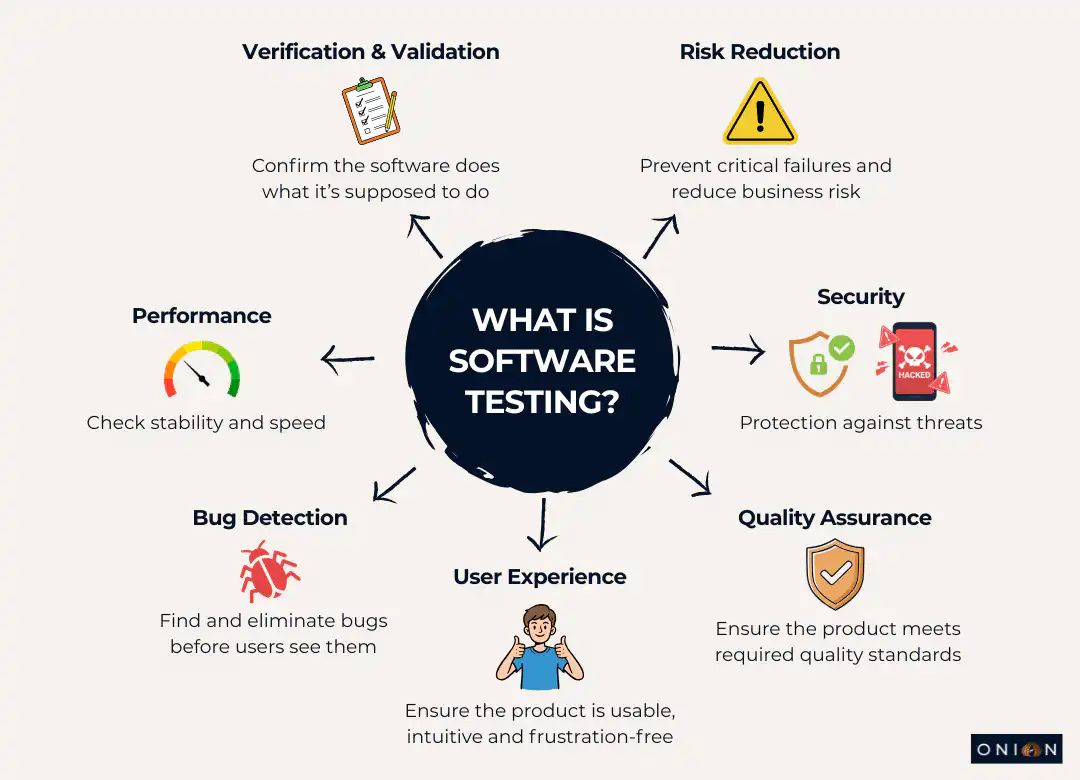
What is software testing in 2026? It’s no longer something you squeeze in at the end of a project. It runs through the entire development life cycle, influencing release speed, stability and user trust. Every app you use, your banking app, your online checkout, your booking system, only feels seamless because testing caught the issues long before you ever saw the product. If you want to understand 'what is software testing' in today’s digital world, it starts with recognising how deeply it’s woven into modern development. This guide walks through the practices that make that level of reliability possible.
Why Software Testing Matters More Than Ever
The impact of weak testing can be catastrophic. A clear example is NASA’s loss of the $125 million Mars Climate Orbiter in 1999. Ground software calculated the thruster force in pounds, but the spacecraft’s navigation system expected metric units. That mismatch skewed the trajectory, pushing the orbiter far lower than planned. Instead of staying safely in orbit, it dipped to just 57 km above the surface and was destroyed in the atmosphere. A basic validation check would have caught the error before launch.
Closer to everyday development, fixing a bug early in the cycle is roughly ten times cheaper than fixing it after release. Beyond cost, good testing prevents reputational damage, protects your users and in some cases, prevents serious harm.
A strong testing approach directly impacts several key outcomes:
- Quality: Bugs get caught before users encounter them.
- Speed: Clean, well-tested code is easier to maintain.
- Cost: Early detection prevents expensive late-stage fixes.
- Customer satisfaction: People recognise when software feels stable and reliable.
What is Software Testing?
To understand 'what is software testing', you need to grasp its two main categories: functional and non-functional.
Functional Testing: Does It Work?
Functional testing checks whether the software performs correctly. It looks at behaviour: logging in, making a payment, processing data and everything else users expect it to do.
It progresses through several levels:
Unit Testing: This is the foundation. Developers write small, focused test cases to check individual components of their code. It helps catch issues before they spread.
Integration Testing: Once units are stable, you test how they work together. This validates communication between modules, services, or features.
System Testing: Here, you test the complete application as a whole. It verifies end-to-end flows and makes sure the system meets all functional requirements.
Acceptance Testing: Business stakeholders perform User Acceptance Testing (UAT) to confirm the software matches user expectations and is ready for release.
Non-Functional Testing: Does It Work Well?
Functional testing checks correctness; non-functional testing checks the experience. This includes:
- Performance testing: How it behaves under load.
- Security testing: Finding vulnerabilities before attackers do.
- Usability testing: Ensuring real users can navigate the product easily.
- Reliability testing: Gauging consistency and stability over time.
Both types are essential if you want to ship software that feels polished.
Manual Test Execution vs Automated Testing
You need both. Manual test execution excels when you need creativity, exploration and human judgment. It’s ideal for usability checks, unexpected behaviours and ad-hoc scenarios.
Automated testing handles repetition. Tools like Selenium and Cypress run tests at speed and scale, making them perfect for regression testing and anything you need to run frequently.
Manual methods vary with the tester’s experience. Automated scripts run with consistency. Understanding where each fits is central to mastering 'what is software testing' in a modern workflow.
Best Practices for Software Testing in 2026
Modern testing practices reflect how software is built today: fast, iterative and collaborative. These best practices keep quality high without slowing teams down.
Start Early with Shift-Left Testing
Shift-left testing is now a core part of efficient software development. Instead of waiting until code is written, teams test during planning and design.
The benefits are significant:
- Earlier bug discovery
- Lower cost of fixes
- Less rework
- Stronger alignment between developers and testers
Implementing shift-left requires QA involvement from the very start, automating unit and integration tests and preparing test environments early in each sprint. This makes testing a shared responsibility rather than a final hurdle.
Prioritise with Risk-Based Testing
Not every feature carries equal risk. Risk-Based Testing (RBT) focuses your efforts where failures would have the biggest impact.
A banking app, for example, should prioritise payments and security over cosmetic features. Identify what’s most likely to fail or most damaging if it does, and give those areas first-class attention.
Integrate Testing into CI/CD
Modern development relies on Continuous Integration and Continuous Delivery (CI/CD), and testing is central to both.
Every code change should trigger automated tests. The suite needs to run quickly, giving instant feedback. Developers should commit small, frequent updates, and feature flags allow incomplete features to be merged safely.
A broken build becomes the team’s top priority, so issues never pile up.
Balance Manual Test Methods and Automated Testing
Automation handles the repetitive work. Manual test methods cover the areas that machines can’t judge well. The best strategies use both:
- Automation for regression, repeatable paths and high-volume checks
- Manual test execution for exploration, UX review and complex edge-case scenarios
This balance creates a resilient testing approach.
Adopt AI-Powered Testing
AI and machine learning now play a major role in 'what is software testing'. They help teams move faster and catch patterns humans might miss.
AI-powered tools can:
- Automatically repair failing test scripts
- Predict where bugs are likely to appear
- Generate test cases from code changes
- Analyse trends from historical defects
AI won’t replace testers, but it removes many repetitive tasks that slow teams down.
Use No-Code and Low-Code Testing Tools
These platforms allow teams to build automated tests without writing code. They speed up test creation, make automation more accessible and reduce maintenance effort.
They’re especially valuable for teams with a mix of technical and non-technical roles. Business analysts, for instance, can participate directly in automation.
Implement Detailed Test Reporting
Modern test reports are no longer static PDF summaries. They’re dynamic, real-time dashboards showing:
- Passed and failed tests
- Reasons for failure
- Blockers and skipped tests
- Screenshots, logs, or recordings
- Direct links to code or defects
Reports are automatically generated after each build, keeping everyone aligned on quality.
Use Crowdtesting for Real-World Coverage
Crowdtesting gives you access to real people using real devices across many environments. It uncovers issues you’d never find in a controlled test lab:
- Device-specific bugs
- Location-dependent issues
- Real-world usability problems
It’s an effective way to validate your application before public release.
Build Security in at Every Stage
Security must be continuous. DevSecOps brings security scanning, penetration testing and policy enforcement into every stage of development.
Make security a shared responsibility. Automated scans belong in your CI/CD pipelines, and security considerations belong in design discussions, not only after build completion.
Common Challenges and How to Solve Them
Even with strong practices, challenges arise. These are the most common and the best ways to handle them.
Cultural Resistance: Teams used to traditional workflows may resist early testing or automation. Education, small pilot projects and visible wins help shift thinking.
Handling Early Bugs: Finding bugs early is good, but teams need a workflow for managing them. Clear triage processes, integrated tooling and defined responsibilities keep the flow under control.
Poor Communication: Miscommunication between QA and development leads to delays and missed bugs. Cross-functional teams, agile ceremonies and shared tools improve alignment.
Resource Constraints: No team has unlimited time or staff. You can’t test everything. Risk-based testing, automation and strategic prioritisation ensure effort goes where it counts.
Core Testing Principles to Remember
Some fundamentals apply to every project:
- Test early and continuously. Early bugs are dramatically cheaper to fix.
- You can’t test everything. Focus on critical and high-risk areas.
- Bugs cluster. Most defects occur in a few modules - target them as high-risk areas.
- Tests lose value over time. Update them regularly to avoid diminishing returns.
- Context matters. Testing needs vary by project type and risk profile.
How to Get Started
If you're new to testing or refining your process, begin with a simple structure:
- Start with unit testing. Developers catch problems closest to the code.
- Add integration tests. Validate components working together.
- Adopt continuous testing. Run automated tests with every code commit.
- Involve QA early. Bring testers into planning and design.
- Measure and improve. Track coverage, fix times, bug detection rates, and refine based on real data.
Key Takeaways - What Is Software Testing?
- Testing is essential for quality and is far cheaper when bugs are caught early.
- Shift-left testing moves testing into the earliest stages of development.
- Functional and non-functional testing together create a complete quality picture.
- Manual and automated testing complement each other.
- Risk-based approaches focus effort where it matters.
- CI/CD pipelines rely on continuous testing.
- AI tools, no-code automation and crowdtesting drive modern efficiency.
- Security must be built into every stage of development.
- Collaboration across roles boosts overall quality.
- Measurement and refinement keep testing effective over time.
Frequently Asked Questions - What Is Software Testing?
Q1: What’s the difference between functional and non-functional testing?
Functional testing verifies whether the software performs its intended tasks, such as login or payments. Non-functional testing evaluates qualities like performance, security and usability.
Q2: When should I use manual test methods vs automated testing?
Manual test execution is ideal for exploratory and usability work. Automation is best for repetitive, frequent, or regression-based tests. Most teams use both.
Q3: What is shift-left testing, and why does it matter?
Shift-left testing starts during planning and design rather than waiting until code is written. It reduces costs, improves collaboration and catches problems early.
Q4: How much test coverage is enough?
There’s no fixed number. Focus on critical and high-risk areas. Quality of tests matters more than total coverage percentage.
Q5: What are the best testing practices for 2026?
Shift-left testing, CI/CD integration, a balanced mix of manual and automated testing, AI-powered tools, risk-based testing and baked-in security.
Q6: How can small teams test effectively with limited resources?
Prioritise high-risk areas, automate repetitive tasks, use no-code tools and start with unit and integration tests to catch issues early.
Q7: What role does AI play in testing?
AI identifies patterns, predicts failures, repairs test scripts and generates test cases automatically. It augments rather than replaces human testers.
Q8: How do I convince management to invest in better testing?
Use cost data, show examples of failures, demonstrate time saved by early detection and run a small pilot to prove the value.
Q9: What’s the biggest mistake teams make?
Treating testing as a final step instead of a continuous process. Waiting until the end leads to expensive rework and lower quality.
Q10: How often should test cases be updated?
Regularly, especially when requirements change, new features arrive, or new bugs are found. Repeating the same old tests loses effectiveness over time.