

Picture finding the same defect three times in different features. The login breaks on special characters. Then the search function fails on them. Then the password reset does too. Each time, your team patches the immediate problem and moves on. But the real issue - improper input validation keeps showing up.
This is why root cause analysis matters. Instead of just fixing what broke, you dig deeper to find out why it broke. Then you address that underlying problem so it stops happening.
What Root Cause Analysis Means in Software Testing
Root cause analysis (RCA) is a systematic method to identify the underlying reason a defect occurs. When you find a bug, the obvious fix is to patch it, close the ticket and move forward. But stopping there means you treat symptoms instead of causes. Root cause analysis asks a different question: what allowed this defect to happen in the first place?
Sometimes the root cause is a coding error. Other times, it's unclear requirements, miscommunication between teams, or a missing test case. Root cause analysis helps you trace the defect back to its origin so you can prevent similar problems later.
For software testers, catching one bug is useful. Preventing ten more is better. When you understand patterns in how defects occur, you spot risks before they become production problems.
Why Root Cause Analysis Matters for Software Quality
The financial impact of defects increases dramatically as they move through the development cycle. According to the IBM Systems Science Institute, fixing a defect during implementation costs six times as much as fixing it during design. That cost jumps to 15 times during testing and 100 times during maintenance.
Research from CTO Fraction confirms these numbers: defects found during testing cost 15 times more than those caught during design and twice as much as those found during implementation.
Beyond cost, defects damage user trust. A study cited by Bugasura found that 90% of app users stopped using an application due to poor performance. When defects slip through, users leave.
Root cause analysis addresses these problems by preventing recurrence. Fix the root cause once, and you eliminate entire categories of future defects.
Common Causes of Software Defects
Understanding what creates defects helps you know where to focus root cause analysis efforts.
Incomplete or unclear requirements lead to misunderstandings between stakeholders and developers. When requirements lack detail or contain ambiguity, teams build the wrong thing or miss critical functionality.
Coding errors happen during development. These include syntax mistakes, logical errors, or incorrect algorithms. Sometimes developers misunderstand a requirement. Other times, they make simple mistakes under time pressure.
Poor design decisions create defects that only appear later in development. Flawed architecture or incorrect design choices often require substantial rework to be properly fixed.
Testing gaps allow defects to reach production. Insufficient test coverage, missing test cases, or skipped testing stages mean bugs slip through undetected.
Changes in requirements introduce defects when not properly managed. Scope changes that aren't communicated clearly or updated in documentation create confusion and errors.
Communication problems between team members or stakeholders create misunderstandings. When developers don't know what testers need, or testers don't understand design decisions, defects follow.
External dependencies bring their own problems. Third-party libraries, APIs, or external systems can introduce defects into your software even when your code works correctly.
How Root Cause Analysis Works
Several proven techniques help teams identify root causes. Each offers a structured way to investigate defects.
The 5 Whys Method
The 5 Whys technique involves asking "why" repeatedly until you reach the root cause. Each answer leads to another question. You usually hit the actual cause within five questions, though sometimes it takes fewer or more.
Example: A payment confirmation email doesn't send.
- Why? The email service didn't receive the trigger.
- Why? The payment module didn't call the email function.
- Why? The integration code lacked error handling.
- Why? The developer didn't know email confirmation was required.
- Why? The requirement wasn't documented clearly.
Root cause: unclear requirements. The fix isn't just adding the email trigger - it's improving how requirements get documented and shared.
Fishbone Diagram (Ishikawa Diagram)
The fishbone diagram provides a visual method to explore multiple potential causes. You write the defect at the head of the diagram, then branch out into categories: people, process, design, code, systems and testing.
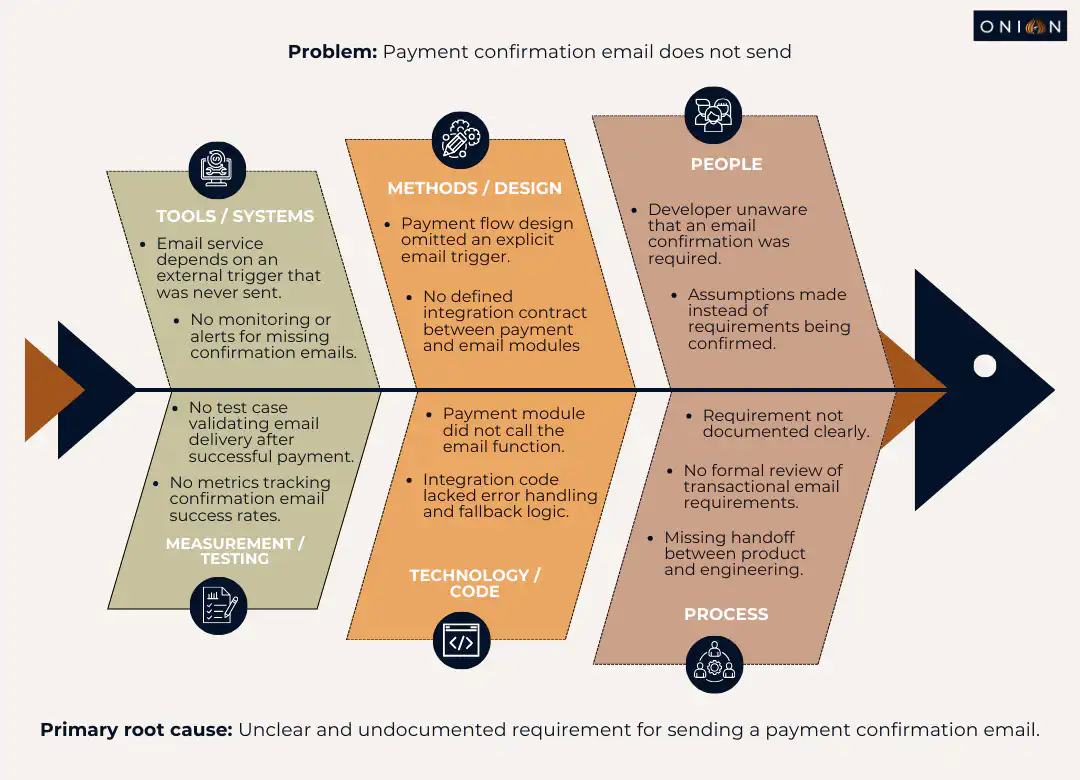
Under each branch, list possible causes. This approach helps when several factors contribute to the problem. The visual structure makes it easier to see relationships between different causes.
Fault Tree Analysis
Fault tree analysis uses a logical diagram to show relationships between a failure and its potential causes. You start with the main failure at the top, then work downward through contributing factors. This technique works well for complex systems where failures have multiple paths.
Pareto Analysis
Pareto analysis applies the 80/20 rule to defects. The principle suggests that roughly 80% of defects come from 20% of causes. By identifying and addressing those vital few causes, you make the biggest impact on quality.
Track defects by category over time. Look for patterns. If most defects relate to a specific module, integration point, or type of requirement, focus your root cause analysis there.
The Root Cause Analysis Process: Step by Step
A structured process helps you conduct effective root cause analysis. Following these steps ensures you address causes rather than symptoms.
Step 1: Define the Problem Precisely
Document the defect thoroughly. Include when and where it appeared, what impact it had, how it was detected and any relevant logs or error messages.
Be specific. "Login failed" is vague. "Login failed when username contained special characters (!@#$%)" gives you something to investigate.
A clear problem statement ensures everyone investigates the same issue. It also helps you avoid assumptions about what happened.
Step 2: Collect Data and Evidence
Gather all information needed to analyse the defect. This includes:
- Error logs and stack traces
- Screenshots or screen recordings
- Steps to reproduce the defect
- Environment details (operating system, browser, device)
- Code changes made recently
- User reports or feedback
- Related defects or incidents
This evidence forms the foundation of your analysis. Collecting it thoroughly helps you avoid guessing.
Step 3: Identify Immediate Causes
Determine what directly triggered the defect. What action, input, or condition caused the failure? This is the surface-level cause - the thing that broke.
In the login example, the immediate cause is that the system doesn't handle special characters in usernames. But that's not the root cause yet.
Step 4: Dig Deeper to Find Root Causes
Use techniques like the 5 Whys or fishbone diagrams to trace the defect back further. Keep asking why the immediate cause happened. Look for system-level factors, not just individual mistakes.
Be open to multiple contributing factors. Complex systems often have complex failures. Several things working together can create a defect that wouldn't happen with just one factor present.
Step 5: Develop and Implement Solutions
Once you identify root causes, define fixes that address them at their source. This often goes beyond code changes.
Solutions might include:
- Updating test coverage to catch similar issues
- Refining requirements documentation processes
- Improving code review checklists
- Training team members on specific techniques
- Changing deployment processes
- Adding automated checks or validation
Choose solutions that prevent recurrence, not just patch this instance.
Step 6: Monitor and Verify Effectiveness
After implementing solutions, monitor the system to confirm the defect doesn't recur. Track related metrics. Check whether similar defects decrease.
Share findings with the wider team. Document lessons learnt so future projects benefit from this analysis.
Best Practices for Effective Root Cause Analysis
Certain practices make root cause analysis more effective and valuable.
Create a Blame-Free Culture
RCA should focus on systems and processes, not individuals. When people fear punishment, they hide problems instead of reporting them. Frame discussions around "what allowed this to happen" rather than "who caused this."
Even when someone made a mistake, ask what system or process could have prevented that mistake. Could better documentation have helped? Would additional training have made a difference? Did time pressure contribute?
A blame-free approach encourages honest investigation and real learning.
Involve Cross-Functional Teams
Different perspectives reveal different aspects of problems. Bring together developers, testers, designers and stakeholders. Developers understand technical details. Testers understand user behaviour and test coverage. Product owners understand requirements.
Together, you piece together what happened and why more completely than any single person could.
Document Thoroughly
Keep records of root cause analyses you conduct. Document:
- The defect and its impact
- Evidence gathered
- Analysis performed
- Root causes identified
- Solutions implemented
- Results of monitoring
Over time, these records reveal patterns. Perhaps certain types of requirements always confuse. Maybe testing under deadline pressure creates gaps. These patterns tell you where to focus improvement efforts.
Prioritise Which Defects to Analyse
Not every defect needs deep root cause analysis. Save detailed investigation for:
- Recurring defects that appear multiple times
- Critical bugs that significantly impact users
- Production defects that escaped testing
- Defects with high business impact
A typo in a tooltip doesn't need the same scrutiny as a payment processing failure.
Use RCA to Improve Testing
Apply findings from root cause analysis to strengthen your test approach. If a defect slipped through because you didn't test a specific scenario, add that scenario to your test suite. If an entire category of tests was missing, build them.
RCA results also inform risk assessment. When you know integration points frequently cause issues, you test those areas more thoroughly. When configuration changes tend to break things, you verify configurations more carefully.
Common Challenges in Root Cause Analysis
Teams encounter several obstacles when conducting RCA. Being aware of these helps you address them.
Time Constraints
Root cause analysis takes time. When pressure mounts to ship quickly, stopping to analyse feels like a luxury. But skipping it means repeating the same mistakes.
Even a brief 15-minute discussion after finding a critical bug can surface useful insights. For less critical defects, schedule RCA sessions weekly to review multiple issues together.
Incomplete Data
You can't analyse what you can't see. Missing logs, unclear reproduction steps, or lost evidence make the investigation difficult.
Build data collection into your testing process. Log relevant information when you find defects. Capture screenshots, record steps and save error messages. This preparation makes later analysis possible.
Jumping to Conclusions
Teams sometimes assume they know the root cause without proper investigation. "It's probably a caching issue" or "That developer always makes that mistake" are assumptions, not analysis.
Follow your chosen technique systematically. Gather evidence. Verify conclusions before implementing solutions.
Treating Symptoms Instead of Causes
The most common mistake is stopping too early. You fix the immediate problem, but don't address why it happened.
If login fails on special characters, adding validation there fixes that specific case. But asking why validation was missing might reveal that input validation is inconsistent throughout the application. Fixing that prevents many future defects, not just this one.
Resistance to Change
Sometimes root cause analysis reveals that processes need to change. People may resist these changes, especially if they've worked a certain way for years.
Present findings with evidence. Show the cost of recurring defects versus the cost of process improvements. Make the case for change clearly.
Tools That Support Root Cause Analysis
Several tools help teams conduct and track root cause analysis more effectively.
Issue tracking systems like Jira, Azure DevOps, or Linear let you document defects thoroughly and link related issues. Good tracking systems help you spot patterns across multiple defects.
Log analysis tools aggregate logs from different systems, making it easier to trace what happened during a failure. Tools like Splunk, ELK Stack (Elasticsearch, Logstash, Kibana), or cloud-native logging help you find relevant information quickly.
Test management platforms track test coverage and results over time. When you analyse defects, these tools show which tests ran, which didn't and where gaps exist.
Collaboration tools such as Confluence, Notion, or Microsoft Teams provide spaces to document RCA sessions, share findings and maintain knowledge bases about past investigations.
Monitoring and observability platforms like Datadog, New Relic, or Grafana capture application behaviour in production. When defects appear in live environments, these tools provide the data needed to understand what happened.
The specific tools matter less than having a systematic way to gather evidence, document analysis and track improvements.
Real-World Impact: Case Studies
Looking at how root cause analysis prevented major issues in real organisations helps illustrate its value.
Healthcare.gov Launch Failures
When Healthcare.gov launched in 2013, technical issues plagued the website. Slow loading, frequent crashes and account creation problems affected millions of users. The U.S. government had to allocate substantial budgets for extensive testing and debugging.
Root cause analysis revealed multiple systemic issues: inadequate load testing, insufficient integration testing between components and unclear requirements for handling high traffic volumes. Addressing these root causes required process changes, not just code fixes.
The lesson: thorough testing and quality processes prevent costly post-launch remediation.
British Airways System Outage
In 2017, British Airways experienced a global IT outage due to a software defect in its check-in system. Multiple flights were cancelled, baggage handling failed, and passengers faced significant delays.
The airline had to deploy additional staff, compensate passengers and invest heavily in fixing the underlying problem. Root cause analysis identified inadequate testing of system changes and insufficient fallback procedures.
The lesson: defects in critical systems need thorough root cause analysis to prevent recurrence and protect business operations.
How Root Cause Analysis Improves Over Time
When teams practice root cause analysis consistently, they develop better instincts for quality.
You start recognising patterns earlier. If you've seen unclear requirements cause defects five times, you spot ambiguous requirements during planning and ask clarifying questions before development starts.
Your test coverage improves because you know which areas tend to have problems. You build tests proactively rather than reactively.
Your team's communication strengthens. Regular RCA sessions create shared understanding about how your system works and what causes failures. This knowledge spreads across the team.
Prevention becomes natural. Instead of just responding to defects, you anticipate and prevent them.
Making Root Cause Analysis Part of Your Process
Root cause analysis delivers the most value when it becomes a regular practice, not a special event.
Schedule time for RCA sessions. Some teams review defects weekly. Others conduct analysis immediately after critical bugs. Find a rhythm that fits your workflow.
Make RCA results visible. Share findings in team meetings, document them in a shared location and reference them during planning sessions.
Track metrics that matter. Count recurring defects, measure time to resolution and monitor defect escape rates. These numbers show whether your RCA efforts are working.
Celebrate improvements. When root cause analysis prevents future defects, acknowledge that success. Recognition reinforces the behaviour.
Key Takeaways
- Root cause analysis identifies underlying reasons for defects rather than just fixing symptoms
- Fixing defects costs 6-15 times more during testing than during design, and up to 100 times more during maintenance
- The 5 Whys, fishbone diagrams, fault tree analysis and Pareto analysis are proven techniques for identifying root causes
- Effective RCA requires a blame-free culture, cross-functional collaboration and thorough documentation
- Patterns revealed through RCA help teams prevent entire categories of defects, not just individual bugs
- Not every defect needs deep analysis - prioritise recurring issues, critical bugs and production escapes
Frequently Asked Questions
Q1: What is the difference between root cause analysis and debugging?
Debugging finds and fixes the immediate problem, the broken code or incorrect logic. Root cause analysis goes further to understand why that problem occurred and what systemic issues allowed it. Debugging answers "what broke," while RCA answers "why did it break, and how do we prevent it."
Q2: How do you know when you've found the actual root cause?
You've reached the root cause when addressing it prevents recurrence, and when going deeper doesn't reveal more actionable problems. If fixing something prevents similar defects across multiple features or modules, you've likely found a root cause. If the problem could still happen despite your fix, keep digging.
Q3: Do small teams need formal root cause analysis?
Team size doesn't determine whether RCA adds value. Small teams benefit from understanding why defects happen, even if their process is less formal. A quick discussion asking "why did this happen" several times still counts as root cause analysis. The key is making it systematic, not necessarily elaborate.
Q4: How long should root cause analysis take?
This depends on defect complexity and impact. A critical production bug might warrant several hours of investigation involving multiple team members. A minor defect might need just 15 minutes. Match the depth of analysis to the severity and recurrence risk of the defect.
Q5: Can root cause analysis be automated?
Parts of RCA can be automated. Tools can aggregate logs, identify patterns in defects and surface correlations automatically. However, the analytical thinking—asking why, interpreting evidence, deciding on solutions—still requires human judgment. Automation supports RCA but doesn't replace it.
Q6: What if root cause analysis reveals process problems that management won't fix?
Document your findings and present the business case clearly. Show the cost of recurring defects versus the cost of process improvements. If management still won't act, focus on what you can control within your team. Sometimes, demonstrating success in one area creates momentum for broader changes.
Q7: How do you conduct root cause analysis for defects found in production?
Follow the same process, but gather additional data about the production environment: what version was running, what load conditions existed and what user actions triggered the failure. Production defects often require analysis of monitoring data, user reports and production logs that aren't available in test environments.
Q8: Should testers conduct root cause analysis or developers?
Both should participate. Testers understand how defects were found, what test coverage exists and how issues affect users. Developers understand technical details and can trace code paths. The best RCA sessions include both perspectives, plus input from product owners who understand requirements.
Q9: How do you track whether root cause analysis is effective?
Monitor metrics like defect recurrence rate, time to resolution and defect escape rate to production. If RCA is working, you should see fewer recurring defects, faster resolution times for related issues, and fewer production escapes over time. Track these numbers before and after implementing RCA to measure impact.
Q10: What's the most common mistake teams make with root cause analysis?
Stopping too early and treating symptoms instead of causes. Teams often fix the immediate problem without asking why it happened. This leads to recurring defects and wasted effort. The solution is to systematically follow a technique like the 5 Whys until you reach systemic causes.
Related articles